
ljn
ClickHouse Learnings
Build real-time analytics with Kafka and ClickHouse.
Written by
Armend Avdijaj
-
It’s Black Friday. Thousands of orders are flowing in—and a fraudulent one slips through. In a traditional setup, you find out hours or days later, after the damage is done. With real-time analytics, that same transaction is analyzed instantly. Suspicious patterns are flagged, the order is blocked, and you save thousands of dollars in milliseconds.
That’s the power of real-time analytics: acting on data the moment it’s created. In 2026, this is table stakes for fraud detection, monitoring, personalization, and live dashboards.
In this guide, we’ll show how to build real-time analytics with Apache Kafka and ClickHouse, and how GlassFlow removes the integration complexity—getting you to production in hours, not months.
Batch vs. Real-Time: The Difference
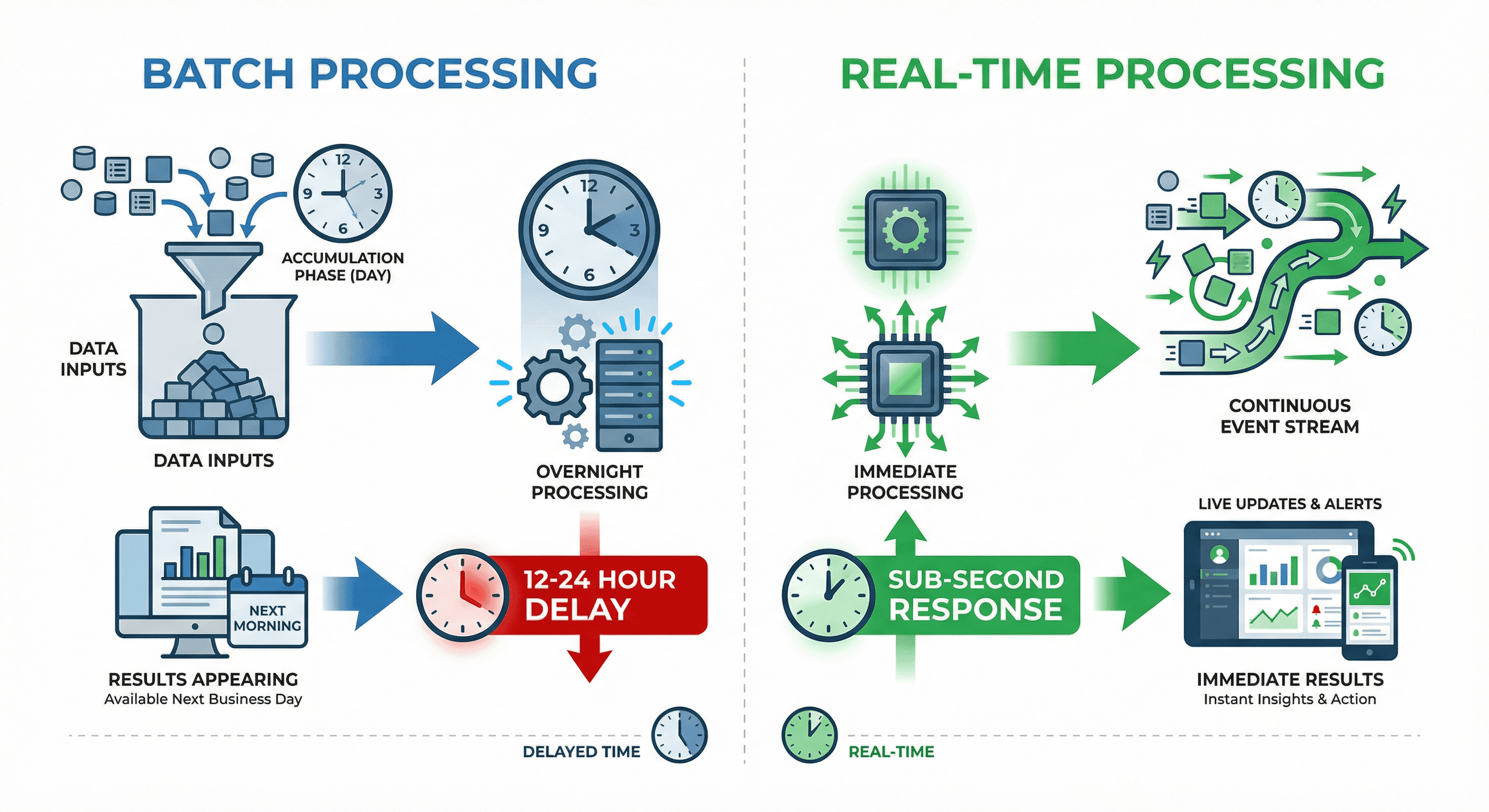
Figure 1. Batch vs Real-Time Processing
Traditional batch processing is like reading yesterday's newspaper—the information is valuable, but it's already history. You collect data throughout the day, run processing jobs overnight, and see results the next morning. For many use cases, this 12-24 hour delay is acceptable.
Real-time analytics flips this model entirely. Instead of accumulating data and processing it in batches, events flow continuously through your system and get processed instantly. The result? You move from "What happened yesterday?" to "What's happening right now, and what should I do about it?"
Key differences:
Batch: Data accumulates → Process overnight → Results next day (12-24hr delay)
Real-Time: Events stream → Process instantly → Results in milliseconds (sub-second response)
This shift enables entirely new capabilities: catching fraud as it happens, personalizing experiences based on live behavior, and responding to system issues before they impact users.
Use Cases: Where Real-Time Analytics Matters
Real-time analytics isn't just a nice-to-have—it's mission-critical for modern businesses across industries. Here are the scenarios where milliseconds make millions:
Industry | Use Case | Impact |
|---|---|---|
🏦 Finance | Fraud Detection | Block suspicious transactions before money moves. Financial institutions analyze transaction patterns in real-time, comparing against known fraud signatures. Multiple transactions from different countries within minutes? Instant alert. |
📊 Operations | Live Dashboards | Fix issues before users complain. When error rates spike or API response times degrade, your team sees it instantly and can respond before users are impacted. No more discovering problems through support tickets hours later. |
💰 E-commerce | Dynamic Pricing | Maximize revenue with instant price updates. Airlines adjust seat prices as booking patterns change. E-commerce platforms respond to competitor pricing and demand spikes in real-time. This continuous optimization drives significant revenue gains. |
🔍 Observability | System Monitoring | Catch performance issues as they happen. Modern applications generate millions of logs, metrics, and traces. Real-time analytics helps teams identify bottlenecks, track down bugs, and maintain SLAs before users notice degradation. |
🎯 Marketing | Personalization | Recommend content based on live behavior. Streaming platforms like Netflix and Spotify analyze what you're watching or listening to right now to suggest the next piece of content. E-commerce sites adjust product recommendations based on your current browsing session. |
According to recent studies, companies implementing real-time analytics report an average 80% increase in revenue thanks to faster decision-making and improved customer experiences.
The Stack: Kafka + ClickHouse
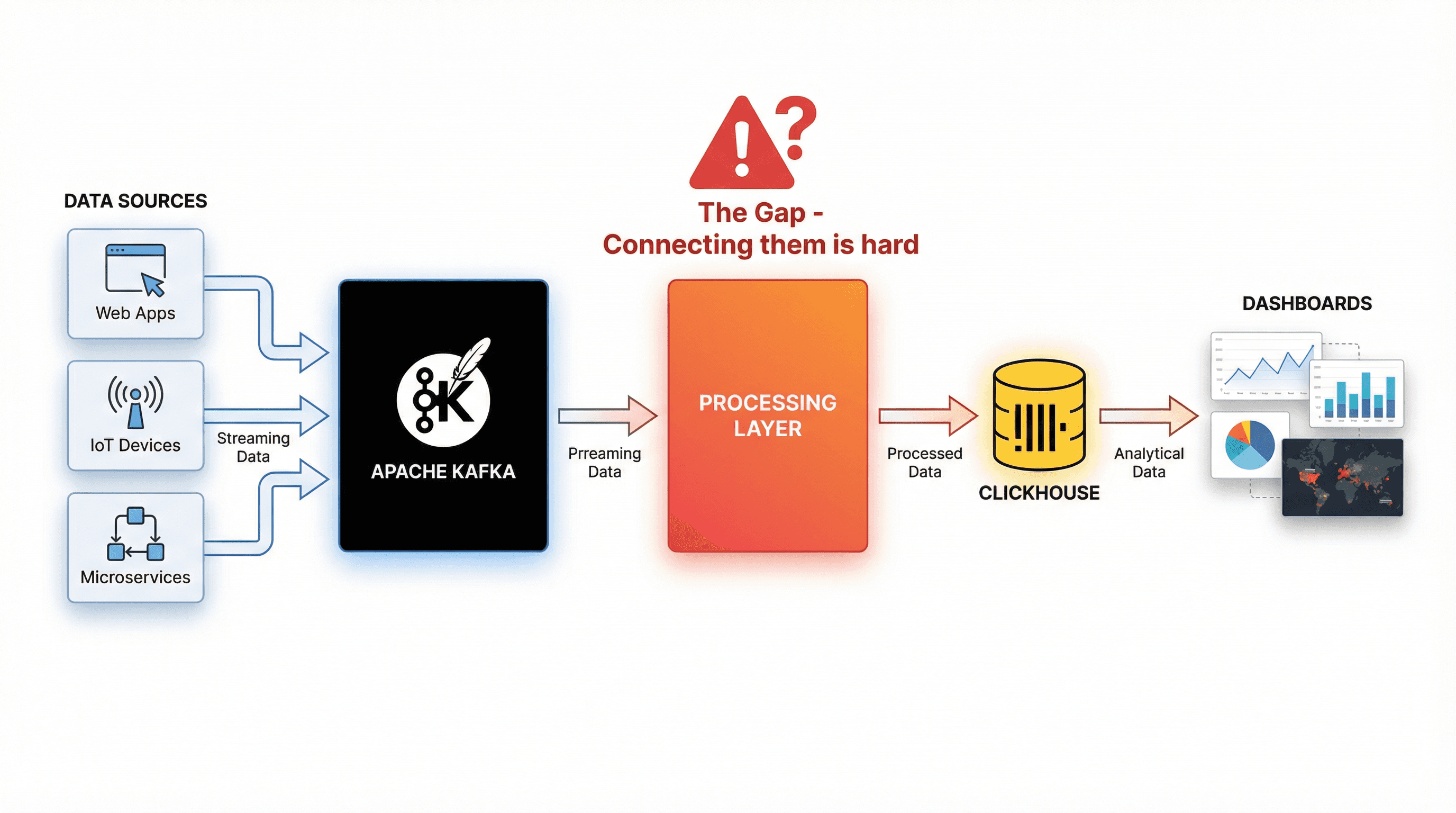
Figure 2. The Kafka ClickHouse Stack: What’s the Challenge?
Building real-time analytics typically relies on two complementary technologies working together.
Apache Kafka: The Event Streaming Backbone
Kafka is a distributed event streaming platform built to handle massive volumes of real-time data. It acts as the central pipeline that captures, stores, and distributes events as they happen.
Why teams use Kafka:
Handles millions of events per second
Persists and replicates data for fault tolerance
Scales horizontally by adding brokers
Decouples producers and consumers
Events are organized into topics and partitions, allowing multiple consumers to process the same stream independently—for dashboards, storage, or ML use cases—without interfering with each other.
ClickHouse: The Analytics Powerhouse
ClickHouse is a columnar database designed for fast analytical queries. Unlike row-based databases, it stores data by column, which makes large-scale scans dramatically faster and more efficient.
What makes it powerful:
Queries billions of rows in seconds
High compression ratios to reduce storage cost
Supports real-time ingestion alongside heavy queries
Uses smart indexing to read only the data needed
For example, if you query average response time by region, ClickHouse reads only the relevant columns—not entire rows—making analytics significantly faster.
The Gap: Integration Challenges
Kafka streams high-velocity events; ClickHouse performs best with optimized batches. Bridging them requires handling:
Data transformation and cleaning
Deduplication (Kafka is at-least-once)
Stream joins
Proper batching
Exactly-once guarantees
Without a proper integration layer, teams often spend weeks building custom consumers, retry logic, and state management—complexity that slows down real-time analytics adoption.
Why ClickHouse is So Fast
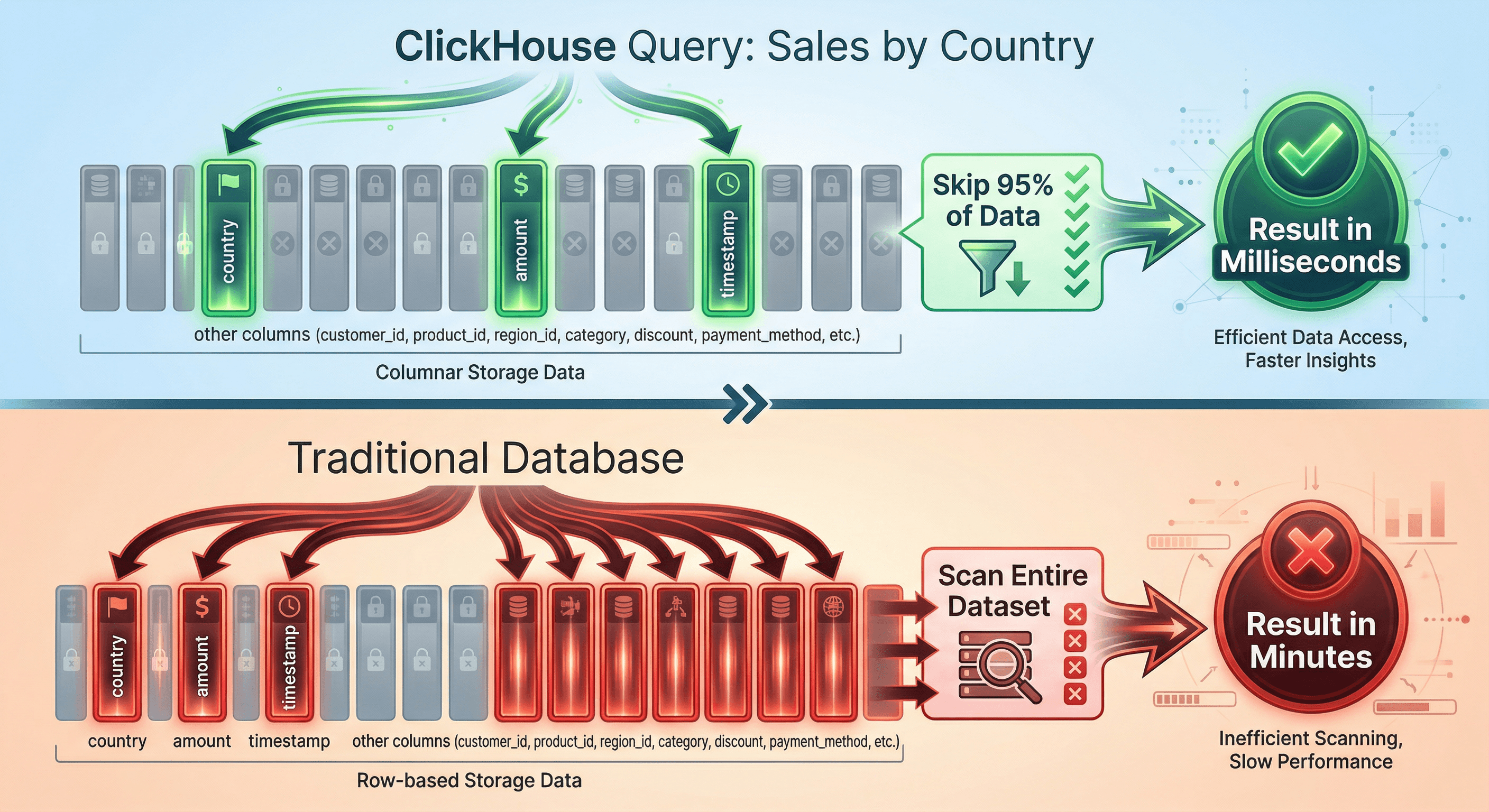
Figure 3. One of the Secrets Behind ClickHouse’s Performance
Let's dive deeper into what makes ClickHouse perfect for real-time analytics. Understanding these concepts will help you appreciate why it's become the database of choice for companies processing billions of events daily.
Columnar Storage: Reading Only What You Need
Traditional databases store complete rows together on disk. When you query for specific columns, the database still reads entire rows into memory, then discards the columns you don't need. This wastes tremendous amounts of I/O.
ClickHouse flips this on its head. It stores each column separately, compressed and optimized for that specific data type. When you query:
ClickHouse only touches three columns: country, amount, and timestamp (Check Figure 3). Everything else—user IDs, product details, payment methods—stays on disk, untouched. This dramatically reduces I/O and allows ClickHouse to scan billions of rows quickly.
Real-world impact: The image above shows a typical query running in milliseconds on ClickHouse vs minutes on a traditional database, scanning the exact same dataset. That's the difference between interactive analytics and waiting around for batch reports.
Data Skipping: Sparse Indexes in Action
ClickHouse uses sparse indexes that track data ranges instead of indexing every row. When you filter by time or another indexed field, entire data blocks that can’t match are skipped altogether.
For a one-hour query on months of data, ClickHouse may scan just 1–5% of the table, which is a major reason queries feel instant even at massive scale.
Real-Time Ingestion: No Waiting for Batch Jobs
Unlike data warehouses that require periodic batch loads, ClickHouse handles continuous ingestion seamlessly. New events are batched into "parts" that get merged in the background while remaining immediately queryable.
This means events can appear in your dashboards seconds after they occur—no waiting for hourly ETL jobs, no explicit commits. You're always querying the freshest possible data, which is essential for real-time decision-making.
The Problem: Integration Complexity
Here's the hard truth: while Kafka and ClickHouse are both excellent at what they do, connecting them reliably is surprisingly complex. This is where many real-time analytics projects stall—teams underestimate the engineering effort required and end up spending months building infrastructure instead of delivering analytics features.
The Five Major Challenges
1. Custom Kafka Consumers Are Non-Trivial: Building a reliable consumer for Apache Kafka means handling offsets, retries, backpressure, scaling, and rebalancing. Get it wrong, and you’ll lose data or create duplicates—most teams underestimate this complexity.
2. Exactly-Once Semantics Are Hard: Kafka is at-least-once by default, so crashes can replay events. Without careful handling, ClickHouse ends up with duplicates and broken analytics.
3. Deduplication with ReplacingMergeTree Has Limits: ClickHouse’s ReplacingMergeTree deduplicates eventually—not deterministically. Duplicates can appear in queries, merges are unpredictable, and distributed setups make it worse.
4. Stream Transformations Require Heavy Frameworks: Joining or enriching streams often requires Apache Flink. It’s powerful, but brings clusters, tuning, complex deployments, and long setup times.
5. Performance Tuning Never Ends: Batch sizes affect lag, memory, write efficiency, and query latency. What works today breaks tomorrow as volumes grow—constant tuning is unavoidable.
Integration Approaches Comparison
Method | Throughput | Complexity | Exactly-Once | Reality |
|---|---|---|---|---|
Kafka Table Engine | 50-120k/sec | ⚠️ Medium | ❌ No | Fragile, silent failures on restarts |
Kafka Connect | 20-45k/sec | 🔴 High | ⚠️ Hard | Memory leaks in v7.2.x, takes weeks to implement exactly-once |
ClickPipes | 40-70k/sec | 🟢 Low | ✅ Yes | Vendor lock-in, $0.30 per million events plus compute |
Apache Flink | Very High | 🔴 Very High | ✅ Yes | Weeks to deploy, requires Java expertise, cluster management overhead |
The bottom line: Most teams spend 2-6 months building and debugging their Kafka-to-ClickHouse integration instead of focusing on the analytics features that drive business value. This is exactly the problem GlassFlow was built to solve.
So, is there a better solution? Yes!
The Solution: GlassFlow
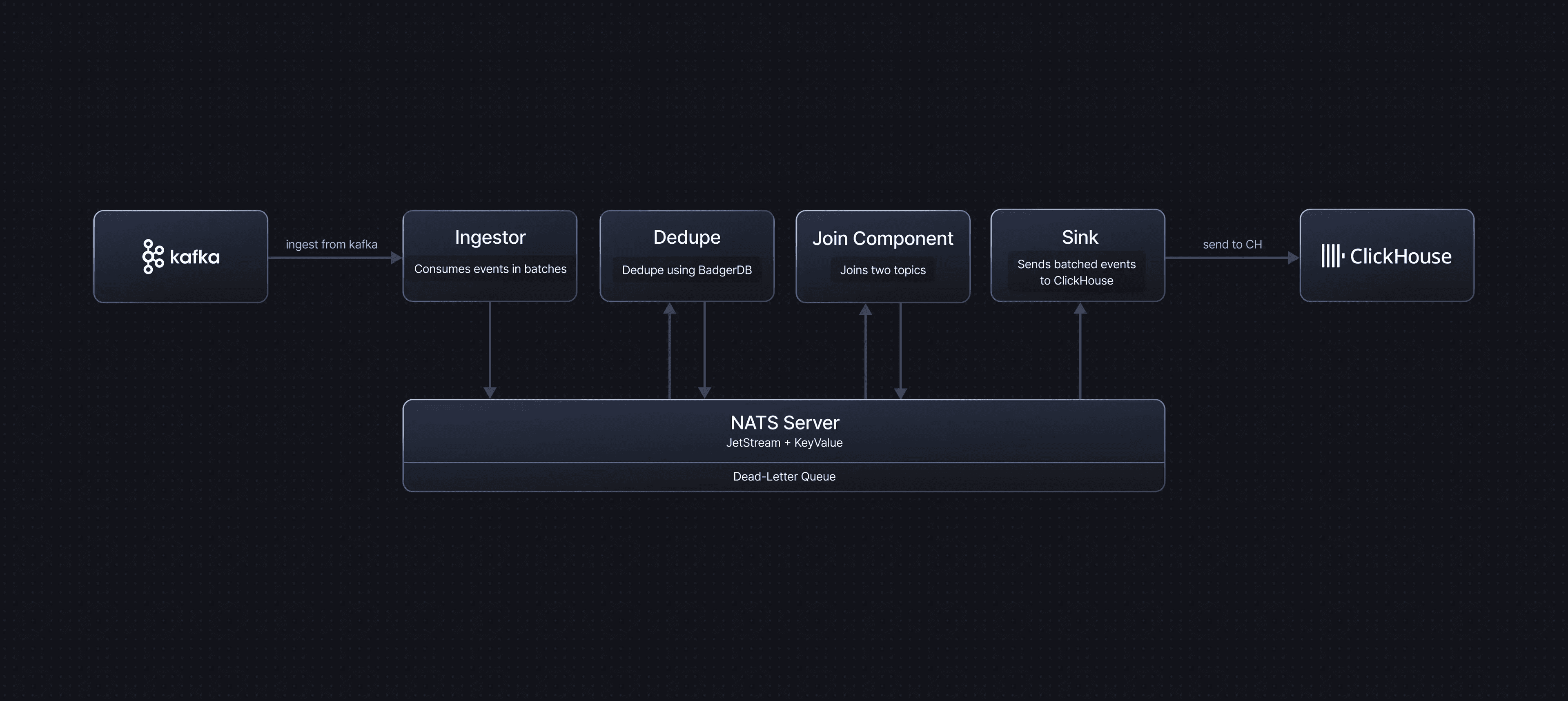
Figure 4. How Glassflow solves the problem?
Now for the good news: you don't have to build all this complexity yourself. GlassFlow is an open-source streaming ETL platform designed specifically to solve the Kafka-to-ClickHouse integration challenge. It handles exactly-once ingestion, deduplication, stream transformations, and schema management through simple UI-based configuration—getting you to production in hours instead of months.
What GlassFlow Provides Out of the Box
Exactly-Once Guarantees
Every event from Kafka is processed and delivered to ClickHouse exactly once—no duplicates, no missing data, no custom code required. GlassFlow handles all the state management, checkpointing, and recovery logic that teams typically spend weeks building. This eliminates the need for complex deduplication workarounds in ClickHouse using ReplacingMergeTree or expensive FINAL queries.
Real-Time Deduplication
Configure a deduplication key (like transaction_id or order_id), and GlassFlow automatically tracks unique events for up to 7 days. Duplicates are rejected instantly—before they ever reach ClickHouse. State is managed automatically and cleaned up as time windows expire, preventing memory issues that plague custom implementations.
Unlike ClickHouse's ReplacingMergeTree which deduplicates asynchronously during unpredictable merges, GlassFlow deduplicates in-stream before data lands. Your queries are always clean—no FINAL keyword needed, no waiting for background merges.
Stream Transformations Without Code
Need to join two Kafka topics? Filter out irrelevant events? Enrich data with lookups? GlassFlow handles these through UI configuration:
Temporal Joins: Combine events from two topics based on matching keys within a configurable time window (up to 60 minutes). Perfect for enriching orders with customer data or combining multiple event streams.
Filtering: Drop events that don't match your criteria before they consume ClickHouse resources
Schema Transformation: Map and transform fields between Kafka and ClickHouse schemas
All of this replaces the Flink clusters, Java code, and operational complexity that traditional approaches require.
Managed Kafka Connectors
GlassFlow includes battle-tested connectors for AWS MSK, Confluent Cloud, and self-hosted Kafka. These connectors handle:
Authentication and TLS/SSL configuration
Automatic retries and error handling
Offset management and consumer group coordination
Horizontal scaling as your throughput grows
Zero-downtime updates and security patches
You configure once through the UI, and GlassFlow handles the operational details forever.
Smart Batch Optimization for ClickHouse
GlassFlow automatically batches writes to ClickHouse based on configurable thresholds (record count or time windows). This minimizes write amplification (too many small writes cause merge issues) while maintaining low latency. The defaults work well for most use cases, but you can tune them for your specific requirements.
Pipeline-Based Throughput and Horizontal Scalability
GlassFlow is built on a pipeline-based architecture, and throughput scales per pipeline. Each pipeline can handle approximately 6.6 TB of data per day, making capacity planning straightforward and predictable.
Need to ingest higher volumes? Simply add more pipelines. For example, ingesting ~90 TB/day would require around 15 pipelines running in parallel (with some buffer for safety). GlassFlow can consume from the same Kafka topic across multiple pipelines, distributing load seamlessly.
What You Get: Traditional vs GlassFlow
✅ No Custom Consumers - Managed connectors handle all the offset management, retries, and scaling complexity
✅ No Flink Complexity - Get stream processing capabilities through simple UI configuration instead of managing clusters and writing Java
✅ No Java Debugging - Zero code required means zero application bugs to hunt down in production
✅ No Infrastructure Management - GlassFlow updates itself and handles operational details automatically
Getting Started in 4 Steps
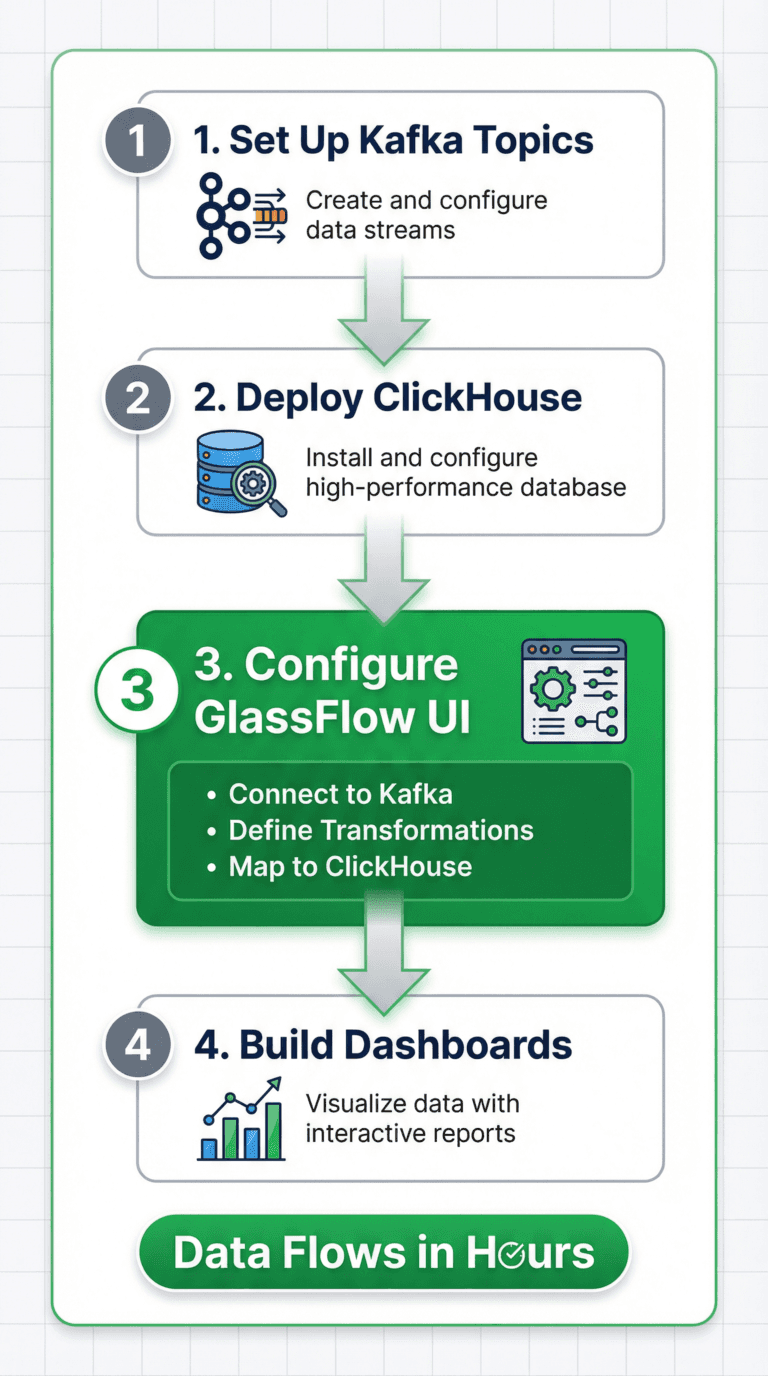
Figure 5. Getting Started with Glassflow
Building your real-time analytics pipeline with GlassFlow is straightforward. Here's the high-level workflow—each step takes minutes, not days.
Step 1: Set Up Kafka Topics
Define what events you want to capture and create corresponding Kafka topics. For example:
user_events- Track user actions (clicks, page views, interactions)transactions- Capture payment and order eventssystem_logs- Monitor application health and errors
Configure retention policies based on your needs. For real-time analytics, 3-7 days is typically sufficient since data is continuously moved to ClickHouse for long-term storage.
Step 2: Deploy ClickHouse
Choose your deployment model:
ClickHouse Cloud: Fully managed, 30-day free trial with $300 credits
Self-Hosted: Complete control, run on your own infrastructure
Managed Providers: Altinity, DoubleCloud, and others offer managed ClickHouse with enhanced support
Create your database and design tables matching your analytics needs.
Example table structure:
Step 3: Configure GlassFlow Pipeline
This is where the magic happens—no code required, just UI configuration:
A. Connect to Kafka
Provide your Kafka cluster details (bootstrap servers, authentication credentials)
GlassFlow supports AWS MSK, Confluent Cloud, and self-hosted Kafka
Select which topics you want to process
Test the connection to ensure everything's configured correctly
B. Define Transformations
Deduplication: Select your unique key (like
event_idortransaction_id) and set the time window (up to 7 days)Stream Joins: If you need to combine multiple topics, specify the join keys and matching window (up to 60 minutes)
Filtering: Add conditions to drop events you don't need in ClickHouse
Field Mapping: Transform field names and types between Kafka and ClickHouse schemas
C. Configure ClickHouse Destination
Connect to your ClickHouse instance (connection string, credentials)
Select the destination database and table
Map event fields to table columns—GlassFlow suggests mappings based on detected schemas
Set batching parameters (GlassFlow provides smart defaults, but you can tune for your specific latency requirements)
D. Deploy and Monitor
Click deploy, and GlassFlow starts processing events immediately
Monitor ingestion rate, processing latency, and any errors through the built-in dashboard
GlassFlow handles all the infrastructure scaling, retries, and recovery automatically
Step 4: Build Dashboards and Queries
With clean data flowing into ClickHouse, connect your visualization tools:
Grafana: Popular open-source option with native ClickHouse support
Superset: Feature-rich, Python-based platform
Metabase: User-friendly, great for non-technical users
Custom Applications: Query ClickHouse directly via HTTP or native protocol
Query response times will feel instant even on large datasets thanks to ClickHouse's optimizations. Focus on creating valuable insights rather than wrestling with data quality issues—GlassFlow ensures clean, deduplicated data lands in your database.
Example real-time query:
This query scans millions of recent events and returns results in milliseconds—perfect for live dashboards that refresh every few seconds.
Conclusion
Real-time analytics is no longer optional—it’s essential. Processing events as they happen enables instant insights, from stopping fraud in real time to personalizing experiences based on live user behavior. This is why modern stacks rely on Apache Kafka for high-throughput event streaming and ClickHouse for fast, interactive analytics on massive datasets.
Together, Kafka and ClickHouse are incredibly powerful—but integrating them reliably is hard and time-consuming. GlassFlow removes that complexity by providing exactly-once ingestion, deduplication, and stream transformations out of the box. Teams can focus on building impactful analytics instead of spending months on plumbing and infrastructure.
Get Started Today
🔗 GlassFlow on GitHub - Open-source streaming ETL for Kafka to ClickHouse. Star the repo and try it with Docker in minutes.
📚 GlassFlow Documentation - Step-by-step guides, tutorials, and architecture patterns. Everything you need to get your first pipeline running.
📖 GlassFlow Blog - Deep dives into ClickHouse best practices, deduplication strategies, join patterns, and real-world case studies from teams processing billions of events.
Did you like this article? Share it!
You might also like
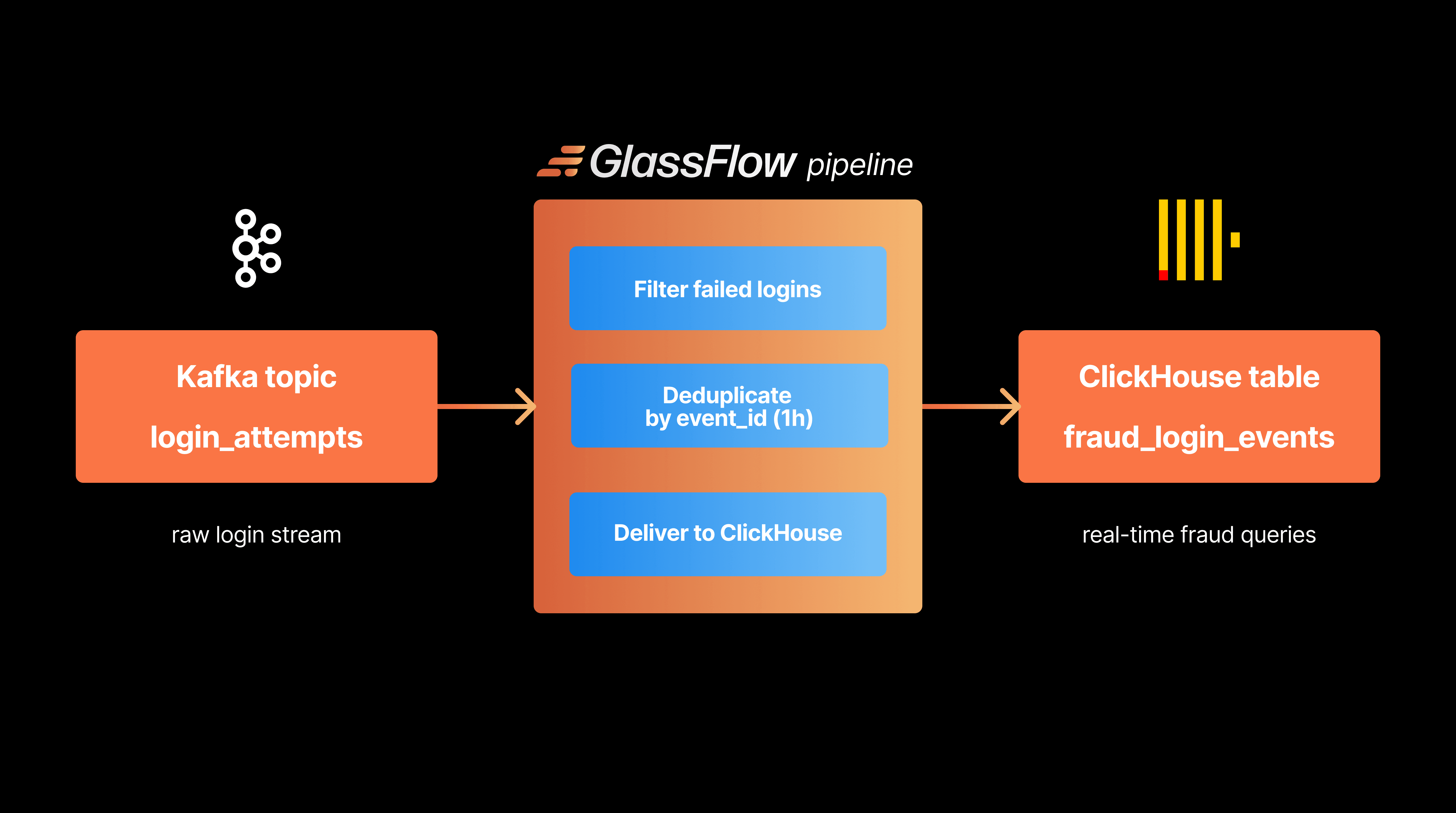
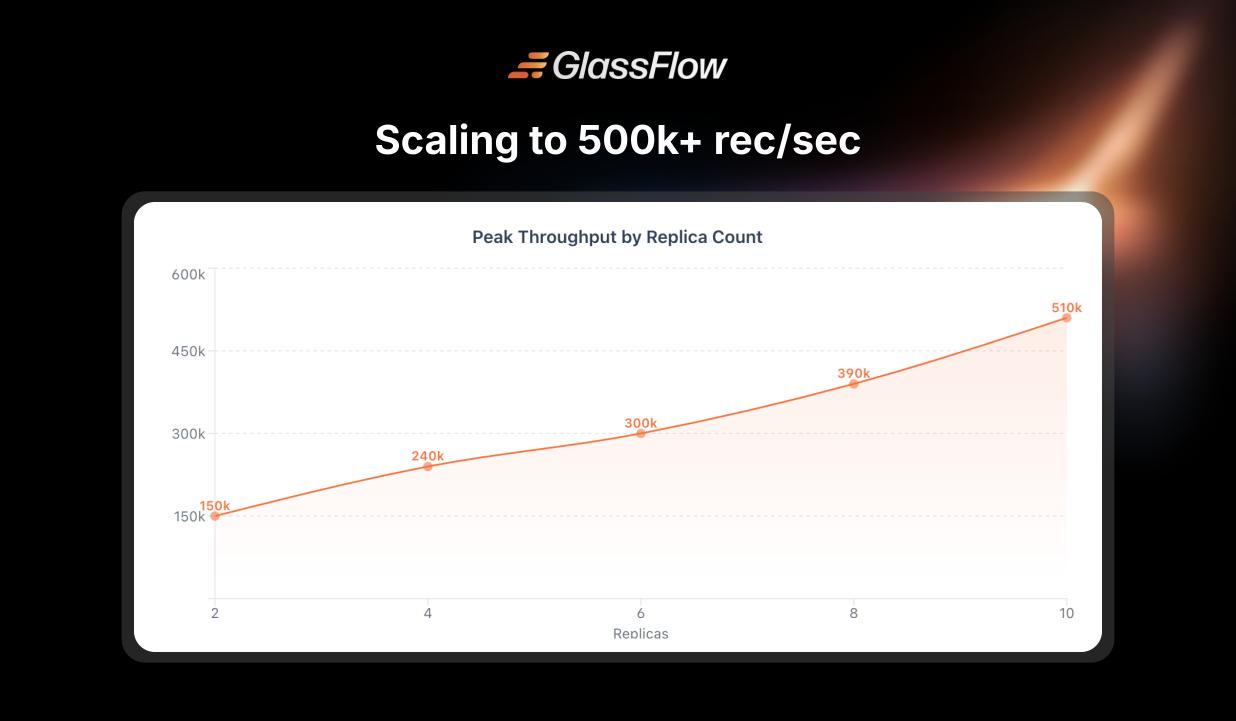
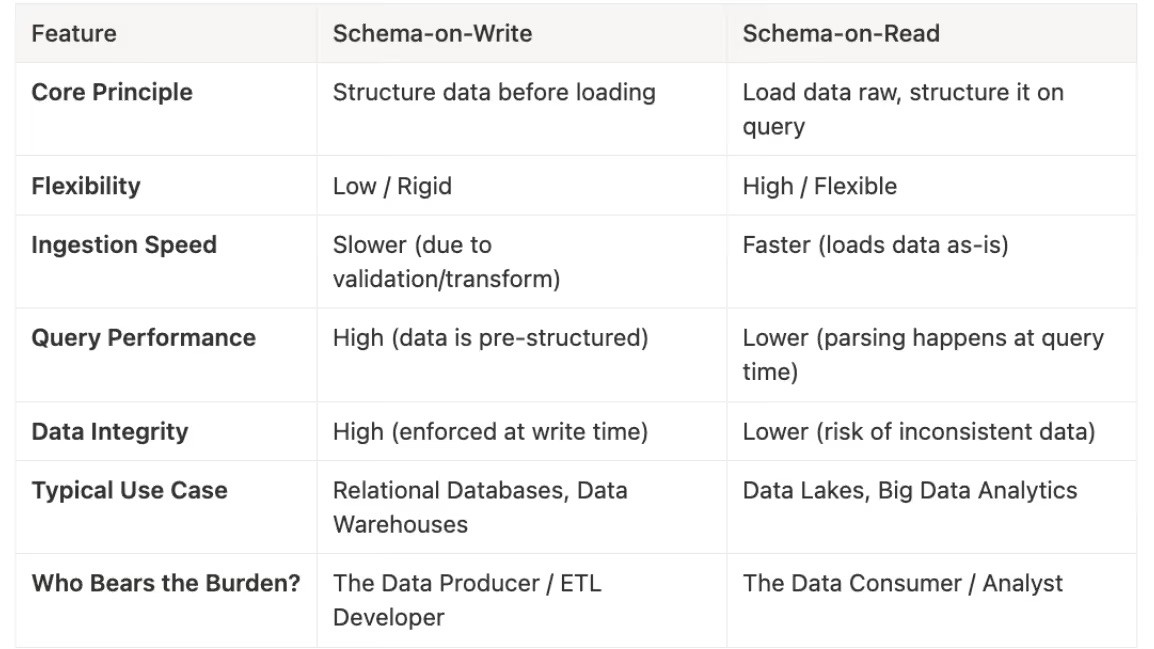

Data transformations at TB scale for ClickHouse
Get query ready data, lower ClickHouse load, and reliable pipelines at enterprise scale.
