
ljn
Comparisons
Compare Snowflake and ClickHouse for modern analytics.
Written by
Armend Avdijaj
-
Introduction
Analytics teams today are under more pressure than ever: not just running end-of-day reports, but powering live dashboards, product metrics, and interactive data experiences. Two platforms often come into view: Snowflake and ClickHouse.
But before we get into the platforms, let’s understand the types of data these systems are often built to serve.
A helpful way to think about analytics workloads is by looking at how long data remains valuable:
Cold Data: This is data that remains useful even days or weeks after it’s created. Think of sales summaries, quarterly performance reviews, and long-term product usage trends. The goal here is accuracy, completeness, and the ability to analyze patterns over time.
Hot Data: This is data that loses value quickly — sometimes within minutes or seconds. Examples include application performance metrics, clickstream events, sensor readings, or real-time user behavior. The key here is freshness. The sooner the system can surface and act on this data, the more value it delivers.
Snowflake has gained fame for its cloud-native, scale-at-ease data warehouse design—ideal for enterprise BI and traditional analytics. ClickHouse, on the other hand, was built for speed, real-time queries and massive concurrency, making it a favorite for event analytics, user-facing products and high-throughput workloads.
Figure 1. Let the comparison begin! (Source)
In this article, we’ll take a high-level look at how Snowflake and ClickHouse compare: what they’re built for, how they differ and how to decide which one fits your needs. And if you’re already on Snowflake and thinking about the next step, we’ll tee up what migrating to ClickHouse looks like.
Architecture & Deployment
In comparing Snowflake and ClickHouse from an architecture and deployment standpoint, it's helpful to zoom out and see how each system is built for scale – and what that means for you.
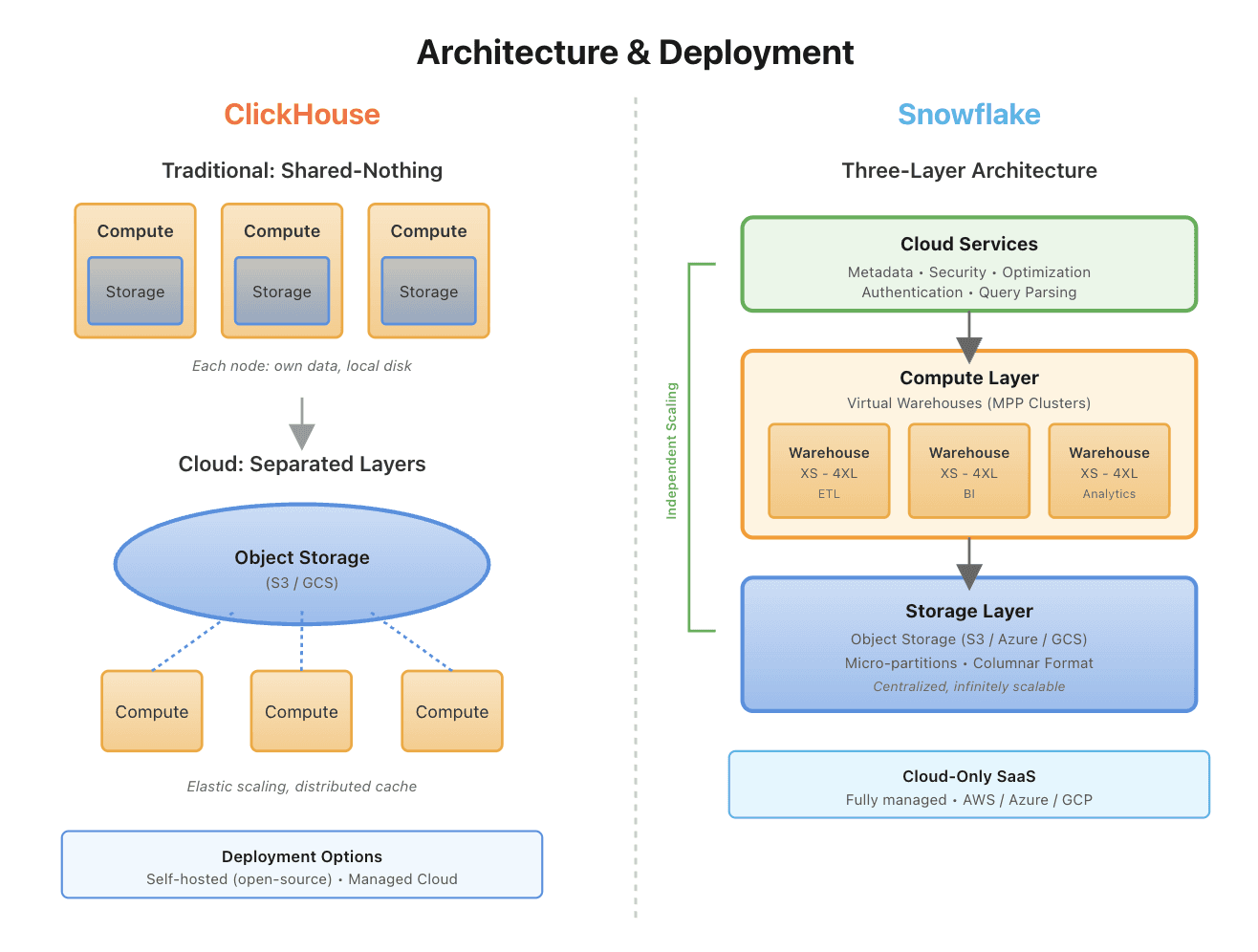
Figure 2. ClickHouse and SnowFlake Architecture Comparison
Now, let’s take a closer look at the main aspects of this section and how these two services compare.
Category | Snowflake | ClickHouse |
|---|---|---|
Storage & Compute Separation | Fully decoupled: storage lives in object store, compute runs on “virtual warehouses” so you can scale compute independently of storage. | Also supports decoupled storage/compute especially in cloud variant: object‐store backed storage (e.g., S3), compute nodes that scale independently. |
Deployment Model | SaaS managed only: you don’t manage hardware; multi-cloud (AWS, Azure, GCP) supported. | Flexible: self-host open source, on-premises, or managed (ClickHouse Cloud) offering full control or convenience. |
Designed For | Large-scale data warehousing, enterprise BI, broad workloads with ease of operations. | High concurrency, real-time/near-real-time analytics, event-driven workloads, flexible deployment scenarios. |
Ingestion / Real-Time Fit | Excellent for batch loads and moderate latency streaming; the architecture supports concurrent workloads but wasn’t originally built for ultra low-latency event processing. | Built from the ground up for fast ingestion, high throughput and concurrency; architecture includes features like “compute-compute separation” for workload isolation. |
Choose Snowflake if you want a fully managed, enterprise-ready platform for large-scale data warehousing and broad BI workloads with minimal operational overhead.
Choose ClickHouse if your focus is on high-concurrency, real-time analytics, and fast ingestion for event-driven workloads, with flexibility in deployment and tuning.
Performance & Workload
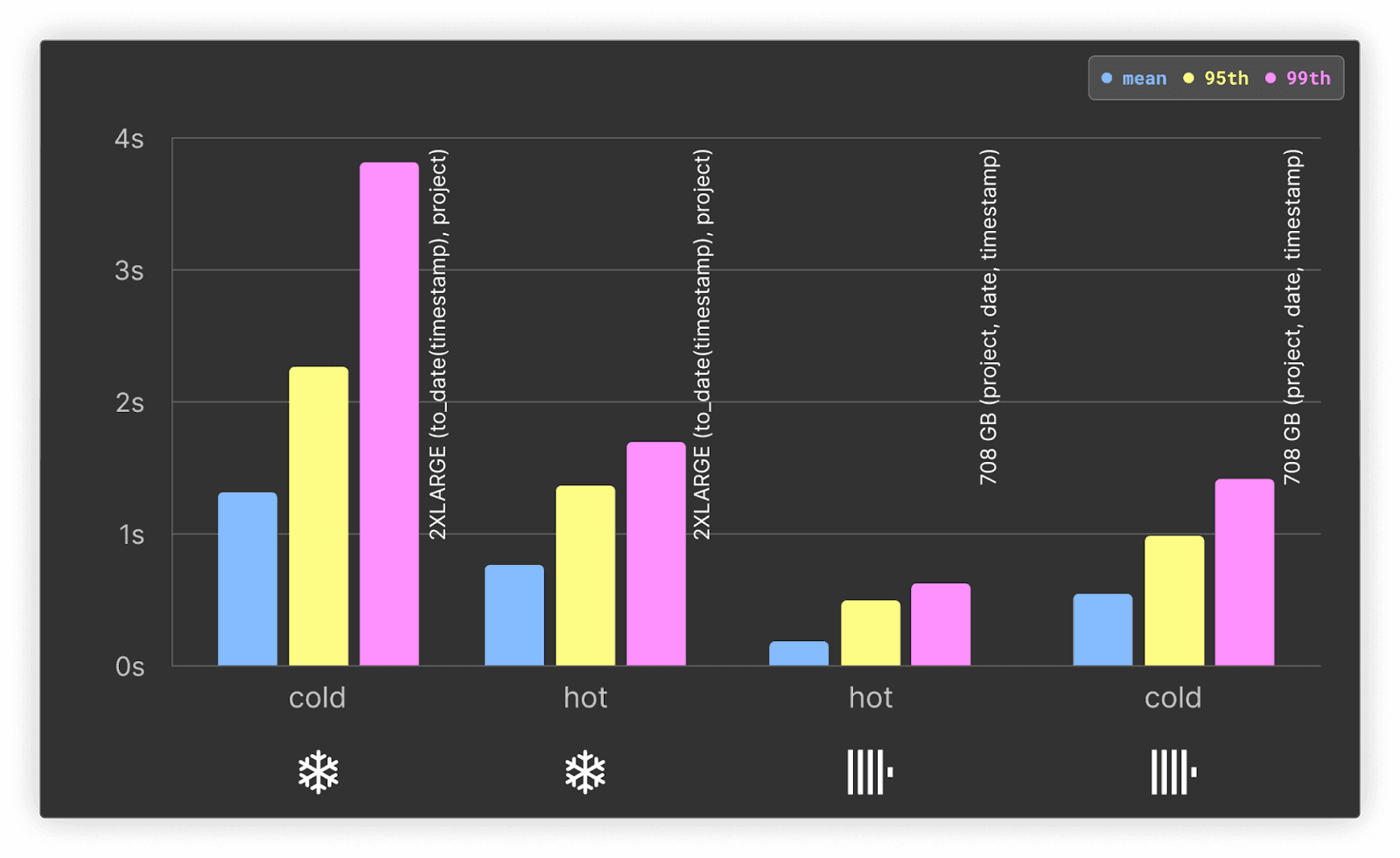
Figure 3. ClickHouse vs Snowflake when it comes to performance (source)
Performance and workload characteristics vary widely between platforms, with trade‑offs in query speed, concurrency, and storage efficiency that shape their ideal use cases.
Category | Snowflake | ClickHouse |
|---|---|---|
Query Latency & Concurrency | Designed for large‑scale BI and many users; latency higher for ultra‑fast interactive queries. | Built for high concurrency, low latency; supports 1,000+ QPS per node. |
Compression & Storage Efficiency | Uses micro‑partitions and columnar storage; decent compression but less focused on raw efficiency. | Offers advanced compression (e.g., ZSTD, LZ4); reports ~38% better compression vs Snowflake. |
Workload Sweet Spots | Ideal for enterprise data warehousing, ELT/BI pipelines, semi‑structured data. | Suited for real‑time dashboards, event/stream analytics, high‑ingest use‑cases. |
Trade‑Offs / Limitations | Strong for broad analytics but cost or latency may increase for real‑time/high‑concurrency workloads. | Excellent speed & efficiency but requires more tuning/ops control; joins and highly ad‑hoc workloads may need tuning. |
If your analytics workload needs sub-second queries, event-driven ingestion, and high concurrency, lean toward ClickHouse.
If your workload is more about enterprise BI, large historic data sets, and broad team use with minimal ops overhead, Snowflake remains strong.
Cost & Flexibility
Cost‑and‑deployment flexibility is a key differentiator—while one platform emphasizes hands‑off, consumption‑based simplicity, the other leans into optional deployment models and cost‑control trade‑offs.
Category | Snowflake | **ClickHouse (incl. Cloud & Open‑Source) |
|---|---|---|
Cost Model | Uses a credit‑based system: you pay compute credits per size of “virtual warehouse”, storage per TB/month, plus extra for features like materialized views, search optimisation, etc. | Offers both self‑hosted open version (no licensing) and managed cloud variant. The cloud tier charges compute (vCPUs/memory), storage, with fewer hidden add‑ons. |
Flexibility | Proprietary, cloud‑only; you are locked into Snowflake’s deployment and feature set. Some advanced features incur tier upgrades. | Open‑source core means you can self‑host (for maximum flexibility) or choose the managed cloud offering — this reduces vendor‑lock‑in and gives you deployment options. |
Predictability, Scaling Overhead & Hidden Costs | While “pause/resume” helps, costs can spike via clustering operations, materialized view maintenance, or automatically scaling large warehouses. | More transparent, linear scaling of compute units, fewer hidden premium charges for clustering/optimisation features. |
When it comes to cost and flexibility, Snowflake delivers a fully managed, usage‑based service ideal for minimal‑ops models, while ClickHouse offers greater deployment options and more predictable cost control for those willing to take on more operational responsibility.
Ecosystem & Operational Considerations
Beyond raw performance and cost, the size of the ecosystem and day‑to‑day operational demands often determine how smoothly a platform can scale and evolve.
Category | Snowflake | ClickHouse |
|---|---|---|
Ecosystem & Integrations | Broad, mature network of connectors, certified partners, BI/ETL/ML tool support, and native governance features. | Strong core engine with open‑source flexibility, but fewer native connectors/tools out‑of‑the‑box; you may need to build or “work around” integrations. |
Operational Overhead & Management | Fully managed service: minimal infrastructure management, automatic scaling/ops handled by vendor. | More hands‑on: self‑host or managed, but requires deeper tuning of cluster internals (sharding, replication, hardware) for production scale. |
Maturity for Enterprise Features (governance, security, data‑share) | Strong support: built‑in governance, data cataloging, sharing across organisations. | Good for analytics‑first use cases, but enterprise feature set (governance, mature sharing, etc) may require additional effort or third‑party tooling. |
Risk / Skill Requirements | Low overhead for operations, but you’re dependent on vendor and may face vendor‑lock‑in. | Higher operational risk if team lacks experience; but with sufficient skill you gain flexibility and control. |
Decision Guide: Which One to Choose?
Now, let’s talk about the data tiers aspect we discussed briefly at the start of this article: If your data falls into distinct tiers—frequently accessed “hot” data vs older, infrequently accessed “cold” data—your choice of platform should reflect how each handles these tiers effectively.
Based on our discussions above:
Choose Snowflake if:
You’re storing large volumes of data where much of it is cold or warm (historical logs, archive tables, seasonal data) and your team prioritises ease of operations and a managed experience.
Your platform must serve enterprise‑wide BI, broad access across teams, and integrate easily with a rich ecosystem without needing tuning for hot‑data performance.
Choose ClickHouse if:
You have a high demand on hot data: sub‑second queries, dashboards updating in real time, high‑ingest event or telemetry flows, or very high concurrency.
You want strong compression and cost‐efficiency for cold storage but demand fast retrieval when needed; ClickHouse recent tiered‑storage capabilities keep hot data on SSDs and cold data in more cost‑effective object stores.
Your team is comfortable managing some operational complexity in exchange for flex deployment models and cost control.
Conclusion
Snowflake and ClickHouse both bring serious analytics power—but they shine in different scenarios. For workloads where a large portion of your data is infrequently accessed (cold/warm) and you value simplicity, fully managed service, and broad enterprise features, Snowflake is the safer choice.
If you’re operating in a world where the fresh, hot data layer drives value—think real-time dashboards, event streams, or high‑QPS analytics—and you want cost-efficient storage for cold data along with fast access for hot data, ClickHouse is the stronger fit, offering blazing speed, high concurrency, and operational flexibility.
Your best pick ultimately depends on latency needs, query patterns, cost constraints, and operational maturity. If you’re already on Snowflake and seeing bottlenecks—whether in speed, cost, or scale—there’s a compelling story ahead for exploring ClickHouse, and our next article will walk you step-by-step through that migration journey.
Did you like this article? Share it!
You might also like

Data transformations at TB scale for ClickHouse
Get query ready data, lower ClickHouse load, and reliable pipelines at enterprise scale.
