Why integrating Flink with ClickHouse is difficult – key challenges explained
Written by
Armend Avdijaj
-
Building a real-time data pipeline has become standard practice for organizations that need time-sensitive insights, and the Flink + ClickHouse combination is one of the most common architectural choices. Apache Flink has been the industry-standard stream processing framework used for this purpose for some time now. ClickHouse, a high-performance analytical database, is frequently chosen alongside Flink for building end-to-end real-time data platforms. However, connecting these two services systems has presented a significant challenge to the community.
The fundamental issue lies in the absence of a native connector between Flink and ClickHouse. Unlike MySQL, PostgreSQL, or Elasticsearch, which all have official Flink connectors, there is no native ClickHouse to Flink connector, leaving teams without dedicated integration support. This has forced data engineers to develop custom solutions that often compromise on performance, reliability, or processing guarantees.
In this article, we'll examine the architectural differences between each platform that make a connector development challenging, illustrate some of the custom solutions that have been developed, and analyze their respective limitations.
We'll be using the open-source version of ClickHouse, which can be installed by following the official documentation.
Understanding Flink and ClickHouse
To understand why this integration is hard, we need to look at how each system is designed and why organizations still want to combine them into a single stream processing pipeline despite the friction.
Both technologies have distinct designs that excel at different aspects of data processing. Let us examine their key components and how their fundamental differences create integration challenges.
Apache Flink Architecture
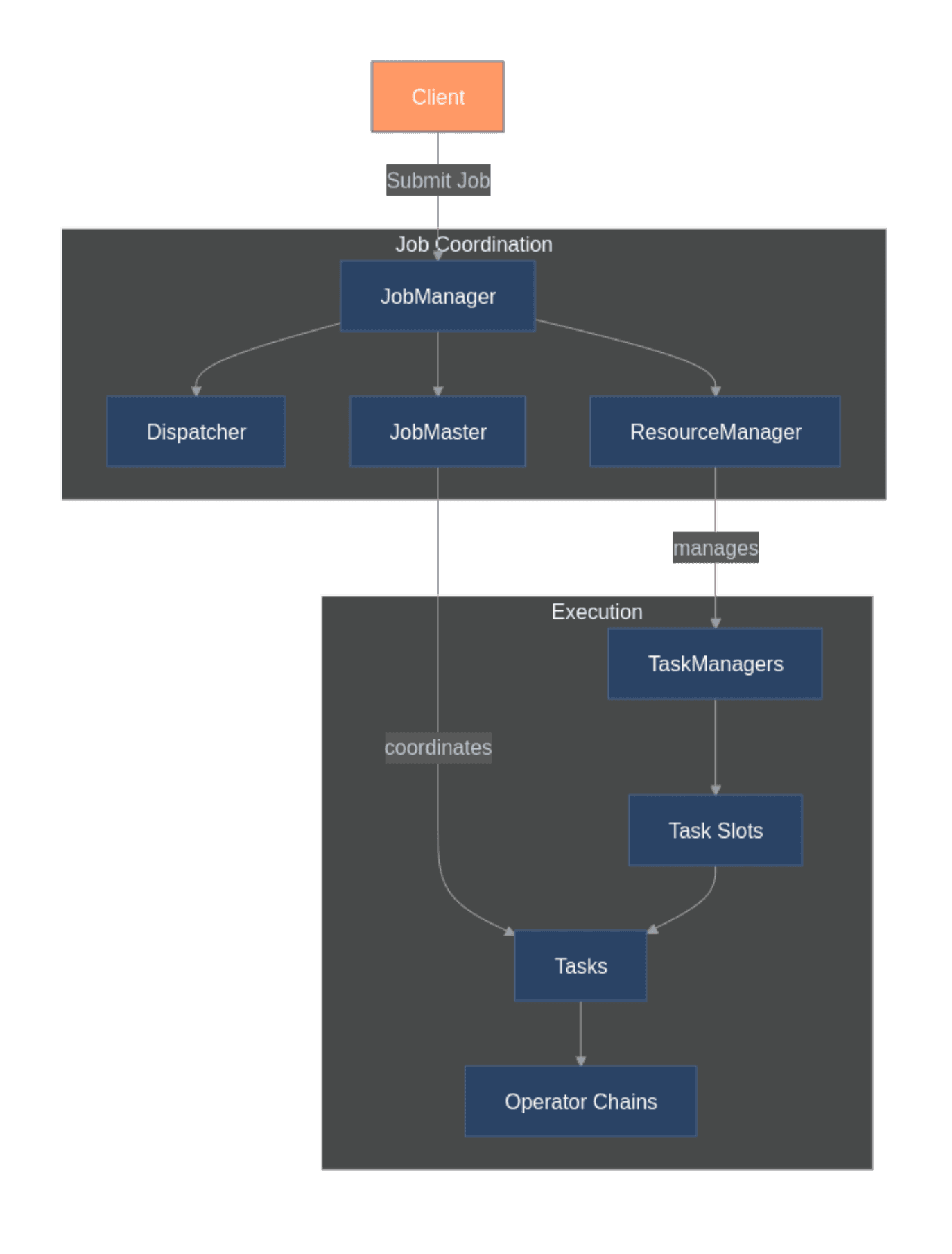
Apache Flink was designed for processing unbounded data streams with consistent state management. Its distributed architecture consists of JobManagers for coordination and TaskManagers for data processing. The JobManager orchestrates execution, while TaskManagers run the actual processing logic across multiple nodes.
Flink's checkpoint mechanism enables true exactly-once processing semantics, critical for applications requiring data accuracy. The framework handles both stream and batch processing through a unified model, treating batch datasets as bounded streams.
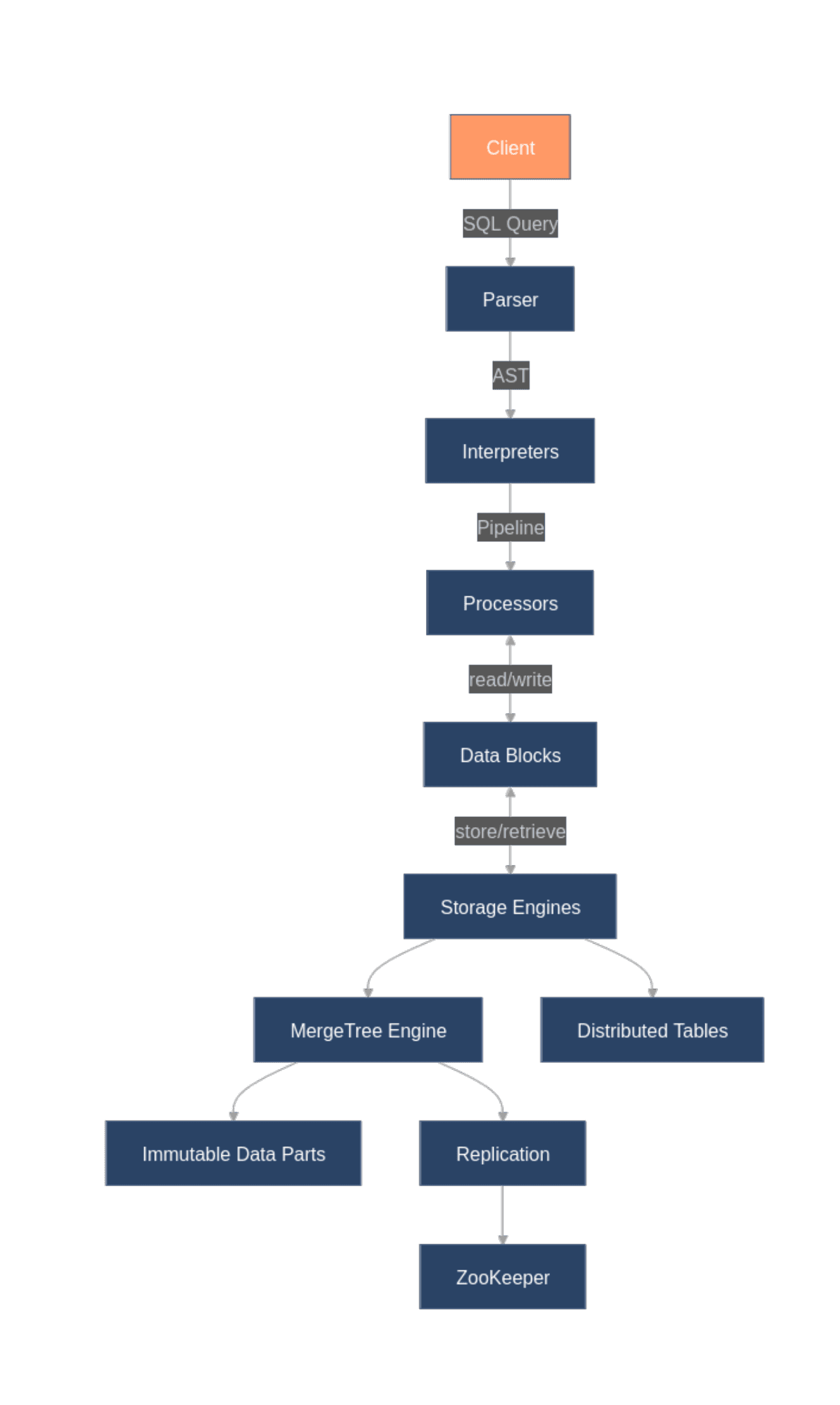
ClickHouse organizes data by columns rather than rows to accelerate analytical queries. Its MergeTree engine family provides efficient storage and querying capabilities, while the Distributed engine enables horizontal scaling across multiple servers.
The database achieves exceptional query performance through vectorized execution, code generation, and effective compression. These techniques allow ClickHouse to scan billions of rows in seconds, a performance that traditional databases can't match for analytical workloads:
However, ClickHouse makes deliberate trade-offs for performance. Most notably, it lacks support for full ACID transactions, instead focusing on append-only operations with eventual consistency across its distributed architecture. This design choice creates significant challenges when integrating with systems like Flink that rely on transactional guarantees.
Architectural Disparities
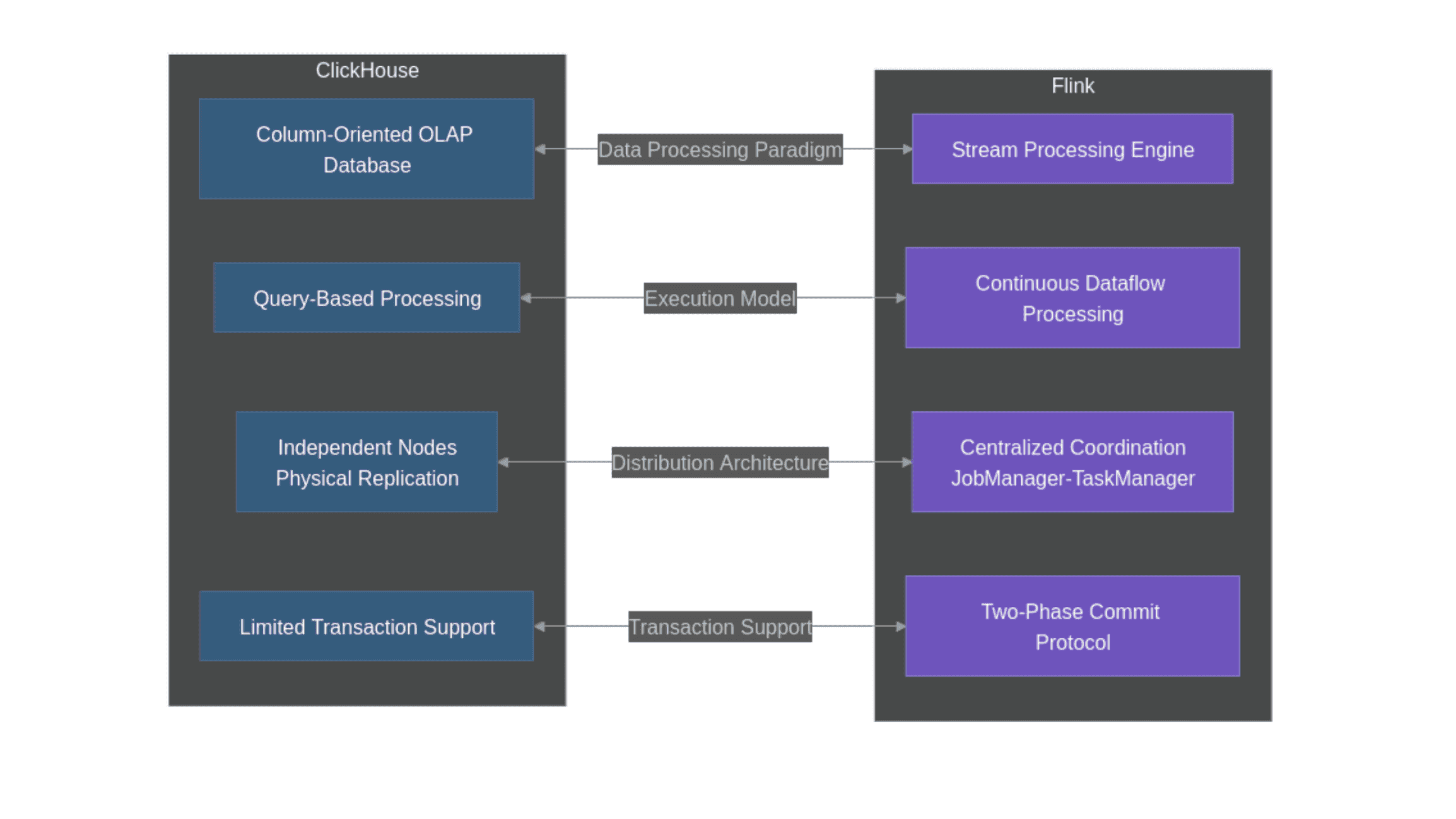
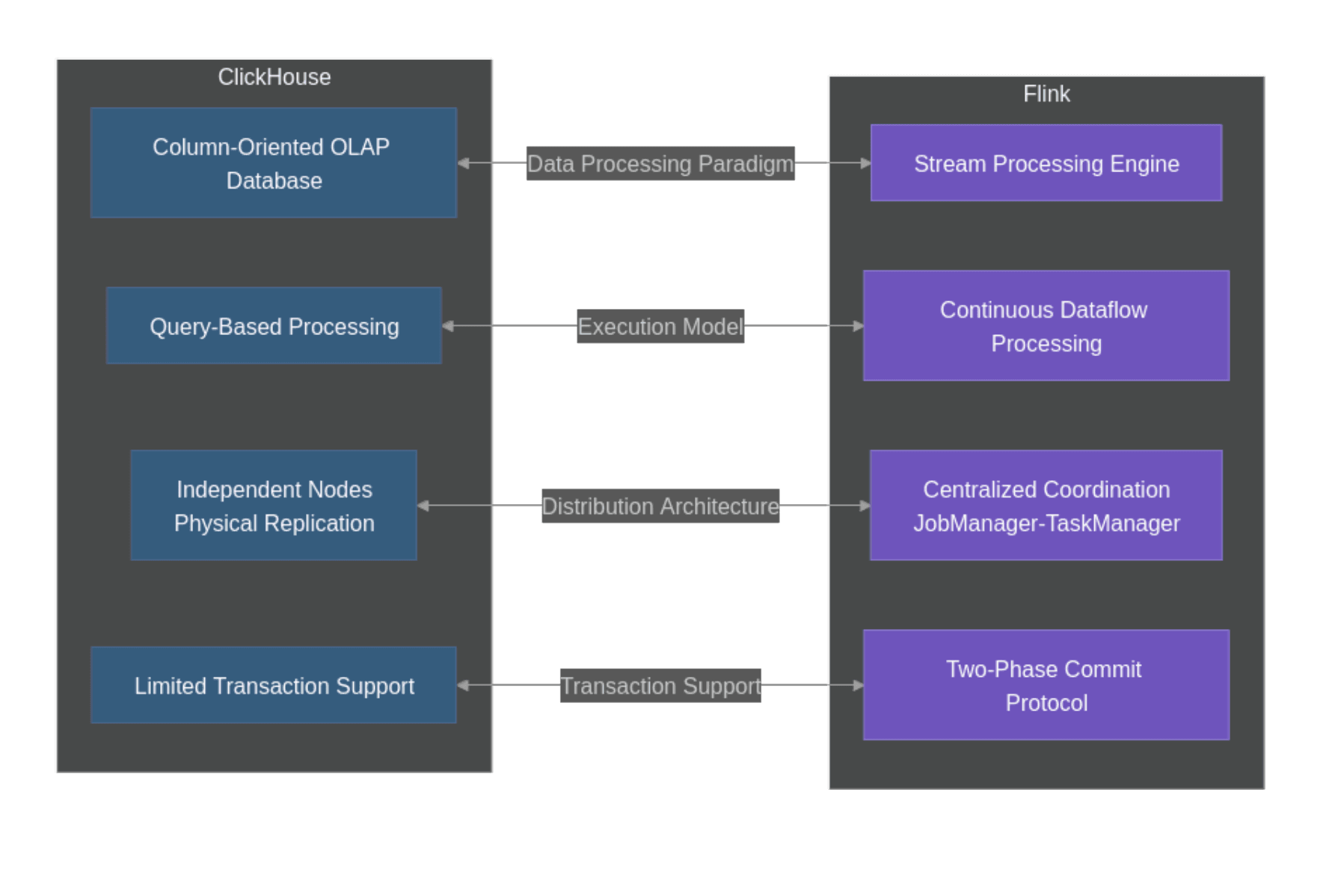
Now that we have established how both frameworks are designed, it should be no surprise that there are significant architectural disparities between them:
Figure 3: Diagram illustrating the architectural mismatch between systems
This diagram highlights the key architectural mismatches between Flink's processing model and ClickHouse's storage approach that complicate integration efforts:
Processing Paradigm: Flink processes continuous streams with stateful operators, while ClickHouse is designed for analytical queries over large datasets.
Execution Model: Flink maintains a persistent dataflow graph with continuous execution, whereas ClickHouse executes discrete queries with its own execution plans.
Distribution Architecture: Flink uses centralized coordination through JobManagers, while ClickHouse employs a more loosely coupled architecture with independent nodes.
Transaction Support: Flink's exactly-once guarantees rely on a two-phase commit protocol, but ClickHouse lacks the full ACID transaction capabilities required for this approach. Exactly-once processing guarantees that each record is processed exactly one time, even in the presence of failures. This is a critical requirement for many applications handling financial transactions, user activity tracking, or business metrics. Flink achieves this through its checkpoint mechanism and two-phase commit protocol when writing to supported external systems.
These fundamental architectural differences explain why building a production-ready ClickHouse to Flink connector has been so challenging, and why no official connector exists in the Flink ecosystem.
As we'll explore in the next section, data engineering teams have developed several workarounds to address these challenges, each with its own limitations and trade-offs.
Current Workarounds and Their Limitations
There are some approaches organizations use to connect Flink with ClickHouse, each addressing the architectural disparities in different ways. In this article, we will focus on the three most popular methods.
To illustrate these, let us set up a practical example with ClickHouse. We'll create a simple event tracking table that might be used in a real-time analytics pipeline.
First, we establish a connection to ClickHouse and create our sample table using the clickhouse-connect library:
# Import librariesimportclickhouse_connectimportpandasaspdimportnumpyasnpfromdatetimeimportdatetime,timedelta# Connect to the ClickHouse serverclient = clickhouse_connect.get_client(host='localhost',port=8123)# Create a sample table for user eventscreate_table_query = """
CREATE TABLE IF NOT EXISTS user_events (
event_id UUID,
user_id String,
event_type String,
event_time DateTime,
properties String
) ENGINE = MergeTree()
ORDER BY (event_time, user_id)
"""client.command(create_table_query)print("Table created successfully")
# Import librariesimportclickhouse_connectimportpandasaspdimportnumpyasnpfromdatetimeimportdatetime,timedelta# Connect to the ClickHouse serverclient = clickhouse_connect.get_client(host='localhost',port=8123)# Create a sample table for user eventscreate_table_query = """
CREATE TABLE IF NOT EXISTS user_events (
event_id UUID,
user_id String,
event_type String,
event_time DateTime,
properties String
) ENGINE = MergeTree()
ORDER BY (event_time, user_id)
"""client.command(create_table_query)print("Table created successfully")
# Import librariesimportclickhouse_connectimportpandasaspdimportnumpyasnpfromdatetimeimportdatetime,timedelta# Connect to the ClickHouse serverclient = clickhouse_connect.get_client(host='localhost',port=8123)# Create a sample table for user eventscreate_table_query = """
CREATE TABLE IF NOT EXISTS user_events (
event_id UUID,
user_id String,
event_type String,
event_time DateTime,
properties String
) ENGINE = MergeTree()
ORDER BY (event_time, user_id)
"""client.command(create_table_query)print("Table created successfully")
Next we insert some random data points:
# Check if table already has datacount_result = client.query('SELECT count() FROM user_events')ifcount_result.result_rows[0][0] > 0:
print(f"Table already contains {count_result.result_rows[0][0]} records. Skipping data insertion.")else:
# Generate sample datanp.random.seed(42)events = []event_types = ['page_view','click','purchase','signup','login']user_ids = [f'user_{i}'foriinrange(1,11)]# Generate 1000 sample eventsstart_date = datetime.now() - timedelta(days=7)foriinrange(1000):
event_id = i + 1user_id = np.random.choice(user_ids)event_type = np.random.choice(event_types)event_time = start_date + timedelta(seconds=np.random.randint(0,7 * 24 * 60 * 60))properties = f'{{"source": "example", "session_id": "{np.random.randint(1000,9999)}"}}'events.append([event_id,user_id,event_type,event_time,properties])# Create a DataFrame and insert datadf = pd.DataFrame(events,columns=['event_id','user_id','event_type','event_time','properties'])# Insert data using clickhouse-connectclient.insert('user_events',df.values.tolist(),column_names=df.columns.tolist())print(f"Inserted {len(df)} rows of sample data")# Verify data was inserted correctlyresult = client.query('SELECT count() FROM user_events')print(f"Total records in table: {result.result_rows[0][0]}")# Sample query to check the datasample = client.query('SELECT * FROM user_events LIMIT 5')print("\\nSample data:")forrowinsample.result_rows:
print(row)
# Check if table already has datacount_result = client.query('SELECT count() FROM user_events')ifcount_result.result_rows[0][0] > 0:
print(f"Table already contains {count_result.result_rows[0][0]} records. Skipping data insertion.")else:
# Generate sample datanp.random.seed(42)events = []event_types = ['page_view','click','purchase','signup','login']user_ids = [f'user_{i}'foriinrange(1,11)]# Generate 1000 sample eventsstart_date = datetime.now() - timedelta(days=7)foriinrange(1000):
event_id = i + 1user_id = np.random.choice(user_ids)event_type = np.random.choice(event_types)event_time = start_date + timedelta(seconds=np.random.randint(0,7 * 24 * 60 * 60))properties = f'{{"source": "example", "session_id": "{np.random.randint(1000,9999)}"}}'events.append([event_id,user_id,event_type,event_time,properties])# Create a DataFrame and insert datadf = pd.DataFrame(events,columns=['event_id','user_id','event_type','event_time','properties'])# Insert data using clickhouse-connectclient.insert('user_events',df.values.tolist(),column_names=df.columns.tolist())print(f"Inserted {len(df)} rows of sample data")# Verify data was inserted correctlyresult = client.query('SELECT count() FROM user_events')print(f"Total records in table: {result.result_rows[0][0]}")# Sample query to check the datasample = client.query('SELECT * FROM user_events LIMIT 5')print("\\nSample data:")forrowinsample.result_rows:
print(row)
# Check if table already has datacount_result = client.query('SELECT count() FROM user_events')ifcount_result.result_rows[0][0] > 0:
print(f"Table already contains {count_result.result_rows[0][0]} records. Skipping data insertion.")else:
# Generate sample datanp.random.seed(42)events = []event_types = ['page_view','click','purchase','signup','login']user_ids = [f'user_{i}'foriinrange(1,11)]# Generate 1000 sample eventsstart_date = datetime.now() - timedelta(days=7)foriinrange(1000):
event_id = i + 1user_id = np.random.choice(user_ids)event_type = np.random.choice(event_types)event_time = start_date + timedelta(seconds=np.random.randint(0,7 * 24 * 60 * 60))properties = f'{{"source": "example", "session_id": "{np.random.randint(1000,9999)}"}}'events.append([event_id,user_id,event_type,event_time,properties])# Create a DataFrame and insert datadf = pd.DataFrame(events,columns=['event_id','user_id','event_type','event_time','properties'])# Insert data using clickhouse-connectclient.insert('user_events',df.values.tolist(),column_names=df.columns.tolist())print(f"Inserted {len(df)} rows of sample data")# Verify data was inserted correctlyresult = client.query('SELECT count() FROM user_events')print(f"Total records in table: {result.result_rows[0][0]}")# Sample query to check the datasample = client.query('SELECT * FROM user_events LIMIT 5')print("\\nSample data:")forrowinsample.result_rows:
print(row)
Which should output the following:
JDBC Connector Approach
This approach involves configuring external JDBC driver dependencies and using Flink's JDBC connector. Organizations must obtain and configure both the Flink JDBC connector and ClickHouse JDBC driver to make this work.
In this example, we want to set up a Flink pipeline that processes streaming data and writes the results to our ClickHouse user_events table.
In concept, a Flink-to-ClickHouse JDBC integration would follow the following pattern:
# Import librariesfrompyflink.datastreamimportStreamExecutionEnvironmentfrompyflink.tableimportStreamTableEnvironment,EnvironmentSettings# Set up the execution environmentenv = StreamExecutionEnvironment.get_execution_environment()t_env = StreamTableEnvironment.create(env)# This configuration is required but not sufficient - the JAR must actually be availablet_env.get_config().get_configuration().set_string("pipeline.jars","file:///path/to/clickhouse-jdbc-0.4.6-all.jar")# Define source data (simulated stream for demonstration)t_env.execute_sql("""
CREATE TEMPORARY TABLE event_source (
event_id STRING,
user_id STRING,
event_type STRING,
event_time TIMESTAMP(3),
properties STRING
) WITH (
'connector' = 'datagen',
'rows-per-second' = '100',
'fields.event_id.kind' = 'sequence',
'fields.event_id.start' = '1001',
'fields.event_id.end' = '2000',
'fields.user_id.length' = '8',
'fields.event_type.length' = '10',
'fields.properties.length' = '50'
)
""")# Define the ClickHouse sink (this requires the JDBC connector to be available)t_env.execute_sql("""
CREATE TABLE clickhouse_sink (
event_id STRING,
user_id STRING,
event_type STRING,
event_time TIMESTAMP(3),
properties STRING
) WITH (
'connector' = 'jdbc',
'url' = 'jdbc:clickhouse://localhost:8123/default',
'table-name' = 'user_events',
'driver' = 'ru.yandex.clickhouse.ClickHouseDriver',
'sink.batch-size' = '1000',
'sink.flush-interval' = '1s'
)
""")# The insert statement that would transfer data (if the connector were available)insert_statement = """
INSERT INTO clickhouse_sink
SELECT
event_id,
user_id,
event_type,
event_time,
properties
FROM event_source
"""# Note: In a complete example, we would execute this statement with:# t_env.execute_sql(insert_statement).wait()# However, this returns an error since we're missing the dependencies abovementioned.
# Import librariesfrompyflink.datastreamimportStreamExecutionEnvironmentfrompyflink.tableimportStreamTableEnvironment,EnvironmentSettings# Set up the execution environmentenv = StreamExecutionEnvironment.get_execution_environment()t_env = StreamTableEnvironment.create(env)# This configuration is required but not sufficient - the JAR must actually be availablet_env.get_config().get_configuration().set_string("pipeline.jars","file:///path/to/clickhouse-jdbc-0.4.6-all.jar")# Define source data (simulated stream for demonstration)t_env.execute_sql("""
CREATE TEMPORARY TABLE event_source (
event_id STRING,
user_id STRING,
event_type STRING,
event_time TIMESTAMP(3),
properties STRING
) WITH (
'connector' = 'datagen',
'rows-per-second' = '100',
'fields.event_id.kind' = 'sequence',
'fields.event_id.start' = '1001',
'fields.event_id.end' = '2000',
'fields.user_id.length' = '8',
'fields.event_type.length' = '10',
'fields.properties.length' = '50'
)
""")# Define the ClickHouse sink (this requires the JDBC connector to be available)t_env.execute_sql("""
CREATE TABLE clickhouse_sink (
event_id STRING,
user_id STRING,
event_type STRING,
event_time TIMESTAMP(3),
properties STRING
) WITH (
'connector' = 'jdbc',
'url' = 'jdbc:clickhouse://localhost:8123/default',
'table-name' = 'user_events',
'driver' = 'ru.yandex.clickhouse.ClickHouseDriver',
'sink.batch-size' = '1000',
'sink.flush-interval' = '1s'
)
""")# The insert statement that would transfer data (if the connector were available)insert_statement = """
INSERT INTO clickhouse_sink
SELECT
event_id,
user_id,
event_type,
event_time,
properties
FROM event_source
"""# Note: In a complete example, we would execute this statement with:# t_env.execute_sql(insert_statement).wait()# However, this returns an error since we're missing the dependencies abovementioned.
# Import librariesfrompyflink.datastreamimportStreamExecutionEnvironmentfrompyflink.tableimportStreamTableEnvironment,EnvironmentSettings# Set up the execution environmentenv = StreamExecutionEnvironment.get_execution_environment()t_env = StreamTableEnvironment.create(env)# This configuration is required but not sufficient - the JAR must actually be availablet_env.get_config().get_configuration().set_string("pipeline.jars","file:///path/to/clickhouse-jdbc-0.4.6-all.jar")# Define source data (simulated stream for demonstration)t_env.execute_sql("""
CREATE TEMPORARY TABLE event_source (
event_id STRING,
user_id STRING,
event_type STRING,
event_time TIMESTAMP(3),
properties STRING
) WITH (
'connector' = 'datagen',
'rows-per-second' = '100',
'fields.event_id.kind' = 'sequence',
'fields.event_id.start' = '1001',
'fields.event_id.end' = '2000',
'fields.user_id.length' = '8',
'fields.event_type.length' = '10',
'fields.properties.length' = '50'
)
""")# Define the ClickHouse sink (this requires the JDBC connector to be available)t_env.execute_sql("""
CREATE TABLE clickhouse_sink (
event_id STRING,
user_id STRING,
event_type STRING,
event_time TIMESTAMP(3),
properties STRING
) WITH (
'connector' = 'jdbc',
'url' = 'jdbc:clickhouse://localhost:8123/default',
'table-name' = 'user_events',
'driver' = 'ru.yandex.clickhouse.ClickHouseDriver',
'sink.batch-size' = '1000',
'sink.flush-interval' = '1s'
)
""")# The insert statement that would transfer data (if the connector were available)insert_statement = """
INSERT INTO clickhouse_sink
SELECT
event_id,
user_id,
event_type,
event_time,
properties
FROM event_source
"""# Note: In a complete example, we would execute this statement with:# t_env.execute_sql(insert_statement).wait()# However, this returns an error since we're missing the dependencies abovementioned.
This code defines a table sink using Flink's SQL API, configuring a JDBC connector pointed at ClickHouse.
Even if the dependencies were properly configured, this approach would still face significant limitations:
Throughput bottlenecks: Connection pooling and statement execution overhead can severely limit performance at scale.
Failure handling challenges: Network issues or connection failures can result in lost or duplicated data.
HTTP Interface Integration
This approach bypasses JDBC overhead by communicating directly with ClickHouse's native HTTP API.
In this example, we want to implement a custom Flink sink function that batches records and sends them to ClickHouse using HTTP requests.
In concept, the approach would follow the following pattern:
# Import librariesfrompyflink.datastreamimportStreamExecutionEnvironmentfrompyflink.datastream.functionsimportMapFunction,RuntimeContextfrompyflink.common.typeinfoimportTypesimportrequestsimportjsonimportuuid# Define custom Flink sinkclass ClickHouseHttpSink(MapFunction):
"""
A custom Flink sink that uses ClickHouse's HTTP interface for data insertion.
This approach provides better performance than JDBC but requires custom implementation.
"""def__init__(self,url,table,batch_size=1000):
self.url = urlself.table = tableself.batch_size = batch_sizeself.batch = []defopen(self,runtime_context: RuntimeContext):
self.batch = []defmap(self,value):
# Add record to batchself.batch.append(value)# Flush when batch size is reachediflen(self.batch) >= self.batch_size:
self._flush()returnvalue# Pass through for downstream operatorsdef_flush(self):
ifnotself.batch:
return# Format the data for ClickHouse insertion via HTTPdata = '\\n'.join([json.dumps(record)forrecordinself.batch])query = f"INSERT INTO {self.table} FORMAT JSONEachRow"try:
response = requests.post(f"{self.url}?query={query}",data=data,headers={'Content-Type': 'application/json'})response.raise_for_status()print(f"Successfully inserted {len(self.batch)} records")self.batch = []exceptExceptionase:
# In production, this error handling would need to be more robustprint(f"Error sending data to ClickHouse: {e}")# No retry mechanism implemented here# Example usage with our existing user_events tabledefdemonstrate_http_sink():
"""
Setup a simple Flink job using the HTTP sink.
Note: This implementation demonstrates the concept but does not
properly integrate with Flink's execution graph.
"""# Create Flink execution environmentenv = StreamExecutionEnvironment.get_execution_environment()# For demonstration, generate synthetic events# In a real application, this would come from Kafka, files, or other sourcesdefgenerate_sample_event():
return{"event_id": str(uuid.uuid4()),"user_id": f"user_{uuid.uuid4().hex[:5]}","event_type": "page_view","event_time": datetime.now().strftime("%Y-%m-%d %H:%M:%S"),"properties": json.dumps({"source": "http-example"})}# Generate 10 example eventssample_events = [generate_sample_event()for_inrange(10)]# Create a data streamstream = env.from_collection(sample_events)# Apply the custom ClickHouse HTTP sinkclickhouse_sink = ClickHouseHttpSink("<http://localhost:8123>","user_events")stream.map(clickhouse_sink,output_type=Types.STRING)# Note: In a complete example, we would execute this with the following:# env.execute("ClickHouse HTTP Sink Example")# However, this returns an error without proper integration as a sink operator
# Import librariesfrompyflink.datastreamimportStreamExecutionEnvironmentfrompyflink.datastream.functionsimportMapFunction,RuntimeContextfrompyflink.common.typeinfoimportTypesimportrequestsimportjsonimportuuid# Define custom Flink sinkclass ClickHouseHttpSink(MapFunction):
"""
A custom Flink sink that uses ClickHouse's HTTP interface for data insertion.
This approach provides better performance than JDBC but requires custom implementation.
"""def__init__(self,url,table,batch_size=1000):
self.url = urlself.table = tableself.batch_size = batch_sizeself.batch = []defopen(self,runtime_context: RuntimeContext):
self.batch = []defmap(self,value):
# Add record to batchself.batch.append(value)# Flush when batch size is reachediflen(self.batch) >= self.batch_size:
self._flush()returnvalue# Pass through for downstream operatorsdef_flush(self):
ifnotself.batch:
return# Format the data for ClickHouse insertion via HTTPdata = '\\n'.join([json.dumps(record)forrecordinself.batch])query = f"INSERT INTO {self.table} FORMAT JSONEachRow"try:
response = requests.post(f"{self.url}?query={query}",data=data,headers={'Content-Type': 'application/json'})response.raise_for_status()print(f"Successfully inserted {len(self.batch)} records")self.batch = []exceptExceptionase:
# In production, this error handling would need to be more robustprint(f"Error sending data to ClickHouse: {e}")# No retry mechanism implemented here# Example usage with our existing user_events tabledefdemonstrate_http_sink():
"""
Setup a simple Flink job using the HTTP sink.
Note: This implementation demonstrates the concept but does not
properly integrate with Flink's execution graph.
"""# Create Flink execution environmentenv = StreamExecutionEnvironment.get_execution_environment()# For demonstration, generate synthetic events# In a real application, this would come from Kafka, files, or other sourcesdefgenerate_sample_event():
return{"event_id": str(uuid.uuid4()),"user_id": f"user_{uuid.uuid4().hex[:5]}","event_type": "page_view","event_time": datetime.now().strftime("%Y-%m-%d %H:%M:%S"),"properties": json.dumps({"source": "http-example"})}# Generate 10 example eventssample_events = [generate_sample_event()for_inrange(10)]# Create a data streamstream = env.from_collection(sample_events)# Apply the custom ClickHouse HTTP sinkclickhouse_sink = ClickHouseHttpSink("<http://localhost:8123>","user_events")stream.map(clickhouse_sink,output_type=Types.STRING)# Note: In a complete example, we would execute this with the following:# env.execute("ClickHouse HTTP Sink Example")# However, this returns an error without proper integration as a sink operator
# Import librariesfrompyflink.datastreamimportStreamExecutionEnvironmentfrompyflink.datastream.functionsimportMapFunction,RuntimeContextfrompyflink.common.typeinfoimportTypesimportrequestsimportjsonimportuuid# Define custom Flink sinkclass ClickHouseHttpSink(MapFunction):
"""
A custom Flink sink that uses ClickHouse's HTTP interface for data insertion.
This approach provides better performance than JDBC but requires custom implementation.
"""def__init__(self,url,table,batch_size=1000):
self.url = urlself.table = tableself.batch_size = batch_sizeself.batch = []defopen(self,runtime_context: RuntimeContext):
self.batch = []defmap(self,value):
# Add record to batchself.batch.append(value)# Flush when batch size is reachediflen(self.batch) >= self.batch_size:
self._flush()returnvalue# Pass through for downstream operatorsdef_flush(self):
ifnotself.batch:
return# Format the data for ClickHouse insertion via HTTPdata = '\\n'.join([json.dumps(record)forrecordinself.batch])query = f"INSERT INTO {self.table} FORMAT JSONEachRow"try:
response = requests.post(f"{self.url}?query={query}",data=data,headers={'Content-Type': 'application/json'})response.raise_for_status()print(f"Successfully inserted {len(self.batch)} records")self.batch = []exceptExceptionase:
# In production, this error handling would need to be more robustprint(f"Error sending data to ClickHouse: {e}")# No retry mechanism implemented here# Example usage with our existing user_events tabledefdemonstrate_http_sink():
"""
Setup a simple Flink job using the HTTP sink.
Note: This implementation demonstrates the concept but does not
properly integrate with Flink's execution graph.
"""# Create Flink execution environmentenv = StreamExecutionEnvironment.get_execution_environment()# For demonstration, generate synthetic events# In a real application, this would come from Kafka, files, or other sourcesdefgenerate_sample_event():
return{"event_id": str(uuid.uuid4()),"user_id": f"user_{uuid.uuid4().hex[:5]}","event_type": "page_view","event_time": datetime.now().strftime("%Y-%m-%d %H:%M:%S"),"properties": json.dumps({"source": "http-example"})}# Generate 10 example eventssample_events = [generate_sample_event()for_inrange(10)]# Create a data streamstream = env.from_collection(sample_events)# Apply the custom ClickHouse HTTP sinkclickhouse_sink = ClickHouseHttpSink("<http://localhost:8123>","user_events")stream.map(clickhouse_sink,output_type=Types.STRING)# Note: In a complete example, we would execute this with the following:# env.execute("ClickHouse HTTP Sink Example")# However, this returns an error without proper integration as a sink operator
The code demonstrates a custom MapFunction that collects records into a batch and periodically sends them to ClickHouse using the HTTP interface. This conceptual approach gives us direct control over batch sizes, error handling, and retry logic, however the implementation as shown would not execute successfully in a Flink pipeline because it doesn't properly integrate as a sink operator in Flink's execution graph.
This method attempts to provide better performance than the JDBC alternative but still carries several challenges:
Improper Flink integration: The implementation must be modified to properly register as a sink operator rather than a simple map function.
Manual batch management: Developers must handle batching, retries, and failure scenarios.
No integration with checkpoints: HTTP requests aren't coordinated with Flink's checkpointing, compromising exactly-once semantics.
Error recovery complexity: Partial batch failures require complex logic to avoid data loss or duplication.
Two-Phase Commit with Temporary Tables
For applications requiring stronger consistency guarantees, we can implement a two-phase commit pattern using temporary tables in ClickHouse. This approach attempts to bridge the gap between Flink's transactional expectations and ClickHouse's limited transaction support.
In the following example, we demonstrate a simplified version of the approach, though it lacks integration with Flink's checkpointing mechanism due to API limitations in the current environment:
# Import librariesfrompyflink.datastreamimportStreamExecutionEnvironmentfrompyflink.datastream.functionsimportSinkFunction,RuntimeContextimportclickhouse_connectimportuuidimporthashlibimporttime# Define Flink Two-Phase Commit Sinkclass ClickHouseTwoPhaseCommitSink(SinkFunction):
"""
A simplified two-phase commit sink for ClickHouse that demonstrates
the temporary table approach for stronger consistency guarantees.
"""def__init__(self,host,port,target_table):
self.host = hostself.port = portself.target_table = target_tableself.client = Noneself.temp_table = Noneself.batch = []self.batch_size = 1000defopen(self,runtime_context: RuntimeContext):
self.client = clickhouse_connect.get_client(host=self.host,port=self.port)self._create_temp_table()definvoke(self,value,context):
# Add record to batchself.batch.append(value)# Insert into temporary tabletry:
self.client.command(f"""
INSERT INTO {self.temp_table} VALUES (
'{value["event_id"]}',
'{value["user_id"]}',
'{value["event_type"]}',
'{value["event_time"]}',
'{value["properties"]}'
)
""")# When batch size is reached, commit to target tableiflen(self.batch) >= self.batch_size:
self._commit_batch()exceptExceptionase:
print(f"Error in ClickHouse operation: {e}")def_create_temp_table(self):
"""Create a temporary table for staging data."""# Generate a unique name for the temporary tabletable_hash = hashlib.md5(f"{self.target_table}_{time.time()}".encode()).hexdigest()[:8]self.temp_table = f"temp_{self.target_table}_{table_hash}"# Create a temporary table with the same structure as the targetself.client.command(f"""
CREATE TABLE IF NOT EXISTS {self.temp_table} AS {self.target_table}
ENGINE = MergeTree()
ORDER BY (event_time, user_id)
""")def_commit_batch(self):
"""Commit data from temporary table to target table."""ifnotself.batch:
returntry:
# "Commit" by copying data from temporary table to target tableself.client.command(f"""
INSERT INTO {self.target_table}
SELECT * FROM {self.temp_table}
""")# Clear the temporary table for the next batchself.client.command(f"TRUNCATE TABLE {self.temp_table}")# Reset batchself.batch = []exceptExceptionase:
print(f"Error committing batch: {e}")defclose(self):
"""Clean up resources."""ifself.client:
# Commit any remaining recordsifself.batch:
self._commit_batch()# Clean up the temporary tableifself.temp_table:
try:
self.client.command(f"DROP TABLE IF EXISTS {self.temp_table}")except:
pass
# Import librariesfrompyflink.datastreamimportStreamExecutionEnvironmentfrompyflink.datastream.functionsimportSinkFunction,RuntimeContextimportclickhouse_connectimportuuidimporthashlibimporttime# Define Flink Two-Phase Commit Sinkclass ClickHouseTwoPhaseCommitSink(SinkFunction):
"""
A simplified two-phase commit sink for ClickHouse that demonstrates
the temporary table approach for stronger consistency guarantees.
"""def__init__(self,host,port,target_table):
self.host = hostself.port = portself.target_table = target_tableself.client = Noneself.temp_table = Noneself.batch = []self.batch_size = 1000defopen(self,runtime_context: RuntimeContext):
self.client = clickhouse_connect.get_client(host=self.host,port=self.port)self._create_temp_table()definvoke(self,value,context):
# Add record to batchself.batch.append(value)# Insert into temporary tabletry:
self.client.command(f"""
INSERT INTO {self.temp_table} VALUES (
'{value["event_id"]}',
'{value["user_id"]}',
'{value["event_type"]}',
'{value["event_time"]}',
'{value["properties"]}'
)
""")# When batch size is reached, commit to target tableiflen(self.batch) >= self.batch_size:
self._commit_batch()exceptExceptionase:
print(f"Error in ClickHouse operation: {e}")def_create_temp_table(self):
"""Create a temporary table for staging data."""# Generate a unique name for the temporary tabletable_hash = hashlib.md5(f"{self.target_table}_{time.time()}".encode()).hexdigest()[:8]self.temp_table = f"temp_{self.target_table}_{table_hash}"# Create a temporary table with the same structure as the targetself.client.command(f"""
CREATE TABLE IF NOT EXISTS {self.temp_table} AS {self.target_table}
ENGINE = MergeTree()
ORDER BY (event_time, user_id)
""")def_commit_batch(self):
"""Commit data from temporary table to target table."""ifnotself.batch:
returntry:
# "Commit" by copying data from temporary table to target tableself.client.command(f"""
INSERT INTO {self.target_table}
SELECT * FROM {self.temp_table}
""")# Clear the temporary table for the next batchself.client.command(f"TRUNCATE TABLE {self.temp_table}")# Reset batchself.batch = []exceptExceptionase:
print(f"Error committing batch: {e}")defclose(self):
"""Clean up resources."""ifself.client:
# Commit any remaining recordsifself.batch:
self._commit_batch()# Clean up the temporary tableifself.temp_table:
try:
self.client.command(f"DROP TABLE IF EXISTS {self.temp_table}")except:
pass
# Import librariesfrompyflink.datastreamimportStreamExecutionEnvironmentfrompyflink.datastream.functionsimportSinkFunction,RuntimeContextimportclickhouse_connectimportuuidimporthashlibimporttime# Define Flink Two-Phase Commit Sinkclass ClickHouseTwoPhaseCommitSink(SinkFunction):
"""
A simplified two-phase commit sink for ClickHouse that demonstrates
the temporary table approach for stronger consistency guarantees.
"""def__init__(self,host,port,target_table):
self.host = hostself.port = portself.target_table = target_tableself.client = Noneself.temp_table = Noneself.batch = []self.batch_size = 1000defopen(self,runtime_context: RuntimeContext):
self.client = clickhouse_connect.get_client(host=self.host,port=self.port)self._create_temp_table()definvoke(self,value,context):
# Add record to batchself.batch.append(value)# Insert into temporary tabletry:
self.client.command(f"""
INSERT INTO {self.temp_table} VALUES (
'{value["event_id"]}',
'{value["user_id"]}',
'{value["event_type"]}',
'{value["event_time"]}',
'{value["properties"]}'
)
""")# When batch size is reached, commit to target tableiflen(self.batch) >= self.batch_size:
self._commit_batch()exceptExceptionase:
print(f"Error in ClickHouse operation: {e}")def_create_temp_table(self):
"""Create a temporary table for staging data."""# Generate a unique name for the temporary tabletable_hash = hashlib.md5(f"{self.target_table}_{time.time()}".encode()).hexdigest()[:8]self.temp_table = f"temp_{self.target_table}_{table_hash}"# Create a temporary table with the same structure as the targetself.client.command(f"""
CREATE TABLE IF NOT EXISTS {self.temp_table} AS {self.target_table}
ENGINE = MergeTree()
ORDER BY (event_time, user_id)
""")def_commit_batch(self):
"""Commit data from temporary table to target table."""ifnotself.batch:
returntry:
# "Commit" by copying data from temporary table to target tableself.client.command(f"""
INSERT INTO {self.target_table}
SELECT * FROM {self.temp_table}
""")# Clear the temporary table for the next batchself.client.command(f"TRUNCATE TABLE {self.temp_table}")# Reset batchself.batch = []exceptExceptionase:
print(f"Error committing batch: {e}")defclose(self):
"""Clean up resources."""ifself.client:
# Commit any remaining recordsifself.batch:
self._commit_batch()# Clean up the temporary tableifself.temp_table:
try:
self.client.command(f"DROP TABLE IF EXISTS {self.temp_table}")except:
pass
While this pattern can approximate exactly-once semantics, it comes with significant trade-offs:
Complex implementation: Error handling and cleanup logic add substantial complexity.
Resource overhead: Additional queries and table operations impact overall system performance.
Kafka as an Intermediary Layer
A fourth approach routes data through Apache Kafka as an intermediary, effectively turning the problem into a Kafka to ClickHouse pipeline: a pattern many teams are already familiar with. Flink processes data and writes results to Kafka topics, while ClickHouse consumes those topics separately.
Let us introduce an example where we have a conceptual Flink job that writes to Kafka, and then illustrates how ClickHouse can consume from that Kafka topic using the same user_events table structure we've been working with:
# Import modulesfrompyflink.datastreamimportStreamExecutionEnvironmentfrompyflink.tableimportStreamTableEnvironment,EnvironmentSettings# Set Up Flink Environmentenv = StreamExecutionEnvironment.get_execution_environment()settings = EnvironmentSettings.new_instance().in_streaming_mode().build()t_env = StreamTableEnvironment.create(env,settings)# Add Required Kafka Connector JAR# Note: The actual JAR file needs to be downloaded manually:# <https://repo1.maven.org/maven2/org/apache/flink/flink-connector-kafka/>t_env.get_config().get_configuration().set_string("pipeline.jars","file:///path/to/flink-connector-kafka.jar")# Define a Source Tablet_env.execute_sql("""
CREATE TEMPORARY TABLE source_events (
event_id STRING,
user_id STRING,
event_type STRING,
event_time TIMESTAMP(3),
properties STRING
) WITH (
'connector' = 'datagen',
'rows-per-second' = '100',
'fields.user_id.kind' = 'random',
'fields.user_id.length' = '10',
'fields.event_type.kind' = 'random',
'fields.event_type.length' = '10',
'fields.properties.kind' = 'random',
'fields.properties.length' = '30'
)
""")# Define a Kafka Sink Tablet_env.execute_sql("""
CREATE TABLE kafka_events (
event_id STRING,
user_id STRING,
event_type STRING,
event_time TIMESTAMP(3),
properties STRING
) WITH (
'connector' = 'kafka',
'topic' = 'user-events',
'properties.bootstrap.servers' = 'kafka:9092',
'format' = 'json'
)
""")# Insert Data From Source to Kafkat_env.execute_sql("""
INSERT INTO kafka_events
SELECT event_id, user_id, event_type, event_time, properties
FROM source_events
""")# On ClickHouse Side, Create Kafka Engine Table (Consume Topic)
# Import modulesfrompyflink.datastreamimportStreamExecutionEnvironmentfrompyflink.tableimportStreamTableEnvironment,EnvironmentSettings# Set Up Flink Environmentenv = StreamExecutionEnvironment.get_execution_environment()settings = EnvironmentSettings.new_instance().in_streaming_mode().build()t_env = StreamTableEnvironment.create(env,settings)# Add Required Kafka Connector JAR# Note: The actual JAR file needs to be downloaded manually:# <https://repo1.maven.org/maven2/org/apache/flink/flink-connector-kafka/>t_env.get_config().get_configuration().set_string("pipeline.jars","file:///path/to/flink-connector-kafka.jar")# Define a Source Tablet_env.execute_sql("""
CREATE TEMPORARY TABLE source_events (
event_id STRING,
user_id STRING,
event_type STRING,
event_time TIMESTAMP(3),
properties STRING
) WITH (
'connector' = 'datagen',
'rows-per-second' = '100',
'fields.user_id.kind' = 'random',
'fields.user_id.length' = '10',
'fields.event_type.kind' = 'random',
'fields.event_type.length' = '10',
'fields.properties.kind' = 'random',
'fields.properties.length' = '30'
)
""")# Define a Kafka Sink Tablet_env.execute_sql("""
CREATE TABLE kafka_events (
event_id STRING,
user_id STRING,
event_type STRING,
event_time TIMESTAMP(3),
properties STRING
) WITH (
'connector' = 'kafka',
'topic' = 'user-events',
'properties.bootstrap.servers' = 'kafka:9092',
'format' = 'json'
)
""")# Insert Data From Source to Kafkat_env.execute_sql("""
INSERT INTO kafka_events
SELECT event_id, user_id, event_type, event_time, properties
FROM source_events
""")# On ClickHouse Side, Create Kafka Engine Table (Consume Topic)
# Import modulesfrompyflink.datastreamimportStreamExecutionEnvironmentfrompyflink.tableimportStreamTableEnvironment,EnvironmentSettings# Set Up Flink Environmentenv = StreamExecutionEnvironment.get_execution_environment()settings = EnvironmentSettings.new_instance().in_streaming_mode().build()t_env = StreamTableEnvironment.create(env,settings)# Add Required Kafka Connector JAR# Note: The actual JAR file needs to be downloaded manually:# <https://repo1.maven.org/maven2/org/apache/flink/flink-connector-kafka/>t_env.get_config().get_configuration().set_string("pipeline.jars","file:///path/to/flink-connector-kafka.jar")# Define a Source Tablet_env.execute_sql("""
CREATE TEMPORARY TABLE source_events (
event_id STRING,
user_id STRING,
event_type STRING,
event_time TIMESTAMP(3),
properties STRING
) WITH (
'connector' = 'datagen',
'rows-per-second' = '100',
'fields.user_id.kind' = 'random',
'fields.user_id.length' = '10',
'fields.event_type.kind' = 'random',
'fields.event_type.length' = '10',
'fields.properties.kind' = 'random',
'fields.properties.length' = '30'
)
""")# Define a Kafka Sink Tablet_env.execute_sql("""
CREATE TABLE kafka_events (
event_id STRING,
user_id STRING,
event_type STRING,
event_time TIMESTAMP(3),
properties STRING
) WITH (
'connector' = 'kafka',
'topic' = 'user-events',
'properties.bootstrap.servers' = 'kafka:9092',
'format' = 'json'
)
""")# Insert Data From Source to Kafkat_env.execute_sql("""
INSERT INTO kafka_events
SELECT event_id, user_id, event_type, event_time, properties
FROM source_events
""")# On ClickHouse Side, Create Kafka Engine Table (Consume Topic)
And then on ClickHouse Side, we can create a Kafka Engine Table to consume the topic:
-- Create a ClickHouse table using Kafka engine to act as a queue for incoming dataCREATETABLE user_events_queue (
event_id String,
user_id String,
event_type String,
event_time DateTime,
properties String
) ENGINE = Kafka
SETTINGS kafka_broker_list = 'kafka:9092',
kafka_topic_list = 'user-events',
kafka_group_name = 'clickhouse_consumer_group',
kafka_format = 'JSONEachRow';
-- Create a materialized view to transform incoming Kafka data and store in our existing user_events tableCREATE MATERIALIZED VIEW user_events_mv TO user_events ASSELECT
event_id,
user_id,
event_type,
event_time,
properties
FROM
-- Create a ClickHouse table using Kafka engine to act as a queue for incoming dataCREATETABLE user_events_queue (
event_id String,
user_id String,
event_type String,
event_time DateTime,
properties String
) ENGINE = Kafka
SETTINGS kafka_broker_list = 'kafka:9092',
kafka_topic_list = 'user-events',
kafka_group_name = 'clickhouse_consumer_group',
kafka_format = 'JSONEachRow';
-- Create a materialized view to transform incoming Kafka data and store in our existing user_events tableCREATE MATERIALIZED VIEW user_events_mv TO user_events ASSELECT
event_id,
user_id,
event_type,
event_time,
properties
FROM
-- Create a ClickHouse table using Kafka engine to act as a queue for incoming dataCREATETABLE user_events_queue (
event_id String,
user_id String,
event_type String,
event_time DateTime,
properties String
) ENGINE = Kafka
SETTINGS kafka_broker_list = 'kafka:9092',
kafka_topic_list = 'user-events',
kafka_group_name = 'clickhouse_consumer_group',
kafka_format = 'JSONEachRow';
-- Create a materialized view to transform incoming Kafka data and store in our existing user_events tableCREATE MATERIALIZED VIEW user_events_mv TO user_events ASSELECT
event_id,
user_id,
event_type,
event_time,
properties
FROM
This approach decouples the writing (Flink) and reading (ClickHouse) components, allowing each system to operate independently. Kafka serves as a buffer that can handle backpressure and provide exactly-once delivery semantics when configured properly. The ClickHouse Kafka engine continuously polls the Kafka topic, and the materialized view transfers the data to our target user_events table.
While this is a valid approach, there is one significant challenge, and that is the introduction of a third component to the architecture:
Coordination overhead: When issues appear, debugging becomes much more complex as data flows through multiple independent services.
Consistency model mismatch: Ensuring proper exactly-once semantics requires precise configurations around Kafka consumer offsets, Flink checkpoints, and ClickHouse's materialized views, with failure in any component potentially causing duplication or data loss.
Cost implications: Running a production-grade Kafka cluster just to enable Kafka to ClickHouse delivery significantly increases infrastructure costs — especially compared to a direct integration.
Practical Impact on Data Pipelines
We've covered four approaches teams use when building a real-time data pipeline from Flink to ClickHouse. Each is feasible, but each carries trade-offs that can significantly affect your pipeline's reliability and maintainability. This has forced engineering teams to carefully evaluate their pipeline requirements since one solution might not work for another use case.
Requires external dependencies but uses standard APIs
Moderate Limited by connection pooling and JDBC overhead
At-least-once
No integration with checkpointing
Limited Basic retry capabilities
Medium Requires dependencymanagement
Medium Requires updating JDBC drivers and monitoring connection pool metrics
HTTP Interface
High Requires custom implementation
High
Direct use of ClickHouse's native API
At-least-once
No checkpoint integration
Manual Requires custom error handling
High Custom code maintenance
High Custom code must be maintained and updated with ClickHouse API changes
Two-Phase Commit
Very High Requires deep knowledge of both systems
Low Multiple stages add latency
Approximate exactly-once Through careful temporary table management
Complex Requires sophisticated failure handling
Very High Temporary table management, monitoring
Very High Requires constant monitoring of temporary tables and cleanup procedures
Kafka Intermediary
Medium Uses standard integration patterns
Moderate Additional network hop but good throughput
Exactly-once
With proper configuration
Robust Built-in recovery mechanisms
Medium Requires Kafka cluster management
Medium-High Requires maintaining multiple systems and monitoring the Kafka cluster
Table 1: Comparison of three common approaches with their strengths and limitations
All four approaches above share a common problem: they require significant engineering effort to build, maintain, and operate on top of your existing Flink and ClickHouse infrastructure. This is why many teams moving data into ClickHouse are replacing Flink entirely for the ingestion layer with purpose-built tooling.
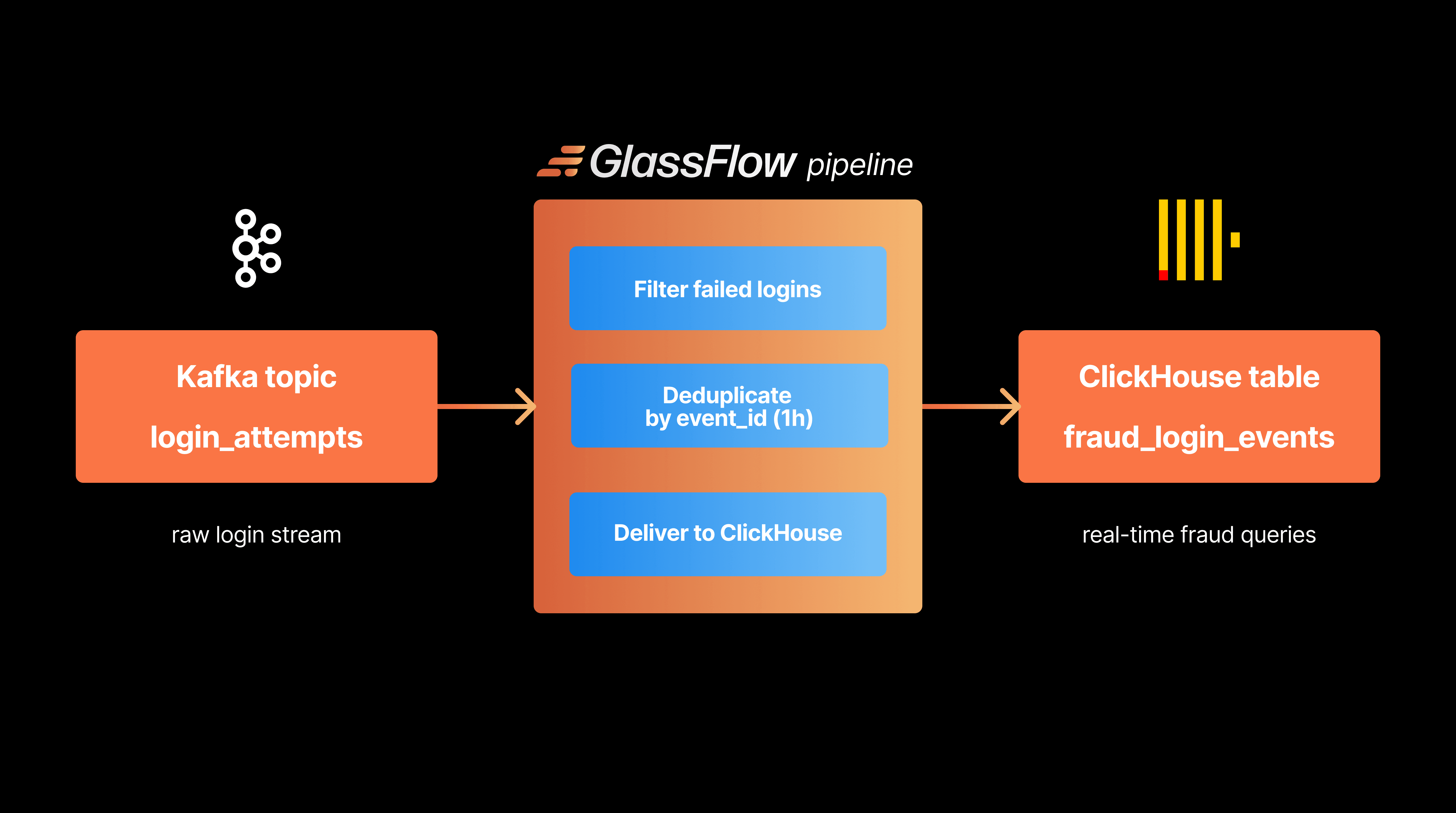
GlassFlow is an open-source stream processing layer designed specifically for Kafka-to-ClickHouse pipelines. It handles deduplication, stream joins, and data transformations upstream of ClickHouse without the operational overhead of running Flink. If the trade-offs in the table above sound familiar, it's worth a look.
Moreover, a "perfect solution" might not even be possible for a given use case, leaving organizations in an uncomfortable position where performance, consistency, simplicity, and/or robustness need to be sacrificed.
Final Thoughts
The absence of a native connector between Apache Flink and ClickHouse creates significant challenges for real‑time analytics pipelines. Architectural differences around transactions, consistency, and write patterns make integrations non‑trivial without custom solutions.
When teams do manage to connect Flink and ClickHouse, the combination is powerful: Flink’s stream processing + ClickHouse’s analytical performance. Getting there, however, requires careful design and a clear understanding of trade‑offs across consistency, performance, complexity, and operations.
For a deeper dive into limitations and hands‑on details, see:
If you’re struggling with these integration challenges and want something more streamlined, consider our open‑source approach: GlassFlow for ClickHouse.
What to read next
If this article raised more questions than it answered, here's where to go: